

Integrating an agent framework
To tailor your Code Agent to suit your needs, consider using an agent framework, such as Google ADK, CrewAI, Microsoft AutoGen, or LangGraph. For this tutorial, you will implement a Code Agent with the help of the CrewAI framework. You will learn how to integrate this kind of framework, leveraging Dataiku tools and resources. The Agent will be a financial assistant, conducting research on companies and utilizing a tool to obtain quotes.
Prerequisites
Dataiku >= 13.4
Python >= 3.10
A code environment with the following packages:
crewai    #tested with 1.4.0
yfinance  # tested with 0.2.66
Creating the Code Agent
You need to create a Code Agent to represent your financial assistant. It will host the code of the different elements needed.
To create a Code Agent, go to the project’s Flow, click the Add item button at the top right, select Generative AI, and click on Code Agent. Choose a meaningful name for the agent, then click the Ok button. In the modal window, choose the “Simple tool-calling agent” and click the Create button.
In the Settings tab, verify you use a code environment with the prerequisites needed. You are now ready to code the financial assistant in the Design tab.
If you need more details on this creation step, you can read the following tutorial, which describes the complete procedure.
Coding the Agent
The architecture of your financial assistant will be as follows:
To achieve this task, the Agent will use an LLM wrapper
During the thinking process of the LLM, a tool will be provided to help find quote information.
The orchestration of those elements will be controlled by a Crew
We will detail and implement each of these elements. You will insert all the code in the code editor of the Design tab of the Code Agent you just created.
Let’s start by setting some environment variables and settings.
    def process(self, query, settings, trace):
        # Specify the Dataiku OpenAI-compatible public API URL, e.g., http://<DATAIKU_HOST>/public/api/projects/<PROJECT_KEY>/llms/openai/v1/
        BASE_URL = ""

        # Use your Dataiku API key instead of an OpenAI secret
        API_KEY = ""

        # Fill with your LLM ID - to get the list of LLM IDs, you can use dataiku.api_client().get_default_project().list_llms()
        LLM_ID = ""

        # Disable CrewAI telemetry if you have no usage of it
        os.environ['CREWAI_DISABLE_TELEMETRY'] = 'true'
This code sets up the OpenAI client by pointing it to its LLM Mesh configuration. You will need several pieces of information for access and authentication:
BASE_URLis a public Dataiku URL to access the LLM Mesh API, e.g.,http://<DATAIKU_HOST>/public/api/projects/<PROJECT_KEY>/llms/openai/v1/. More information is available in the Concept And Examples section.If you don’t have a valid Dataiku
API_KEY, go to your Dataiku Profile & Settings and then the API Keys Tab. Generate a new key.This code snippet provides instructions on obtaining an
LLM_ID.
Creating a tool
Now, we can add the code for the tool that will retrieve quote information from the Yahoo Finance service.
        @tool("Get quotes from Yahoo Finance")
        def get_quotes(company: str) -> str:
            """
                This tool is used to retrieve quotes for a company from Yahoo Finance.
                The output is a text with a line per quote found, separated by a new line.

                :param company: str, the name of the company to retrieve quotes for.
            """
            message = f"No quote found for {company}"

            quotes = yf.Search(company, include_research=True).quotes
            if len(quotes) > 0:
                message = f"I found {len(quotes)} quote" + "s.\n" if len(quotes) >= 1 else ".\n"
                for quote in quotes:
                    message += f"from {quote['exchange']} with symbol {quote['symbol']} for {quote['score']}\n"

            return message
The CrewAI framework offers an annotation dedicated to the tool creation. Always document the purpose, action, input, and output of the tool in the docstring: you will significantly improve your results.
Wrapping the LLM
In order to use our Dataiku LLM mesh, we will create a CrewAI wrapper for it.
        chosen_llm = LLM(
            model=LLM_ID,
            api_key=API_KEY,
            base_url=BASE_URL,  # Optional custom endpoint
            temperature=0.7,
            max_tokens=4000,
            top_p=0.9,
            frequency_penalty=0.1,
            presence_penalty=0.1,
            stop=["END"],
            seed=42,  # For reproducible outputs
            stream=True,  # Enable streaming
            timeout=60.0,  # Request timeout in seconds
            max_retries=3,  # Maximum retry attempts
            logprobs=True,  # Return log probabilities
            top_logprobs=5,  # Number of most likely tokens
            reasoning_effort="medium"  # For o1 models: low, medium, high
        )
You have all the parameters to fine-tune your usage, whether you want to adjust the temperature, limit the number of tokens, or enable streaming.
Creating the Agent
The Agent is the entity that will make decisions, collaborate with other agent or decide to use tools.
        financial_agent = Agent(
            role="Financial and economics Assistant",
            goal="Assist the user on specific tasks about finance and companies and answer queries",
            backstory="You are a financial assistant and you help the user "
                      "by answering questions on financial information about companies. "
                      "Do not assume any info. "
                      "To find the available financial quotes for the company, use a tool. "
                      "If you find several quotes, list all of them. "
                      "If you don't know, just say you don't know. "
                      "Answer with 3 or 4 sentences maximum and use a polite tone.",
            allow_delegation=False,
            llm=chosen_llm,
            tools=[get_quotes],
            verbose=True
        )
nameanddescriptionare there to help you identify what you want to do with this Agent and have a descriptive value for yourself and your teams.rolewill define the Agent’s action and its domain of expertise.goalwill direct the Agent’s effort and guide its decision-making.backstorywill give the Agent depth and background.llmis as simple as it sounds: it’s the model you will use for this agent.toolswill list the tools that this Agent will be able to use.
Creating the Task
The Task is the definition of the expected action an Agent will fulfill.
        financial_task = Task(
            description=(
                "1. Analyze and answer the question: {topic}."
                "2. Find the name of the company in the question. If there is no company name, stop working here and tell it in the answer."
                "3. Find the available financial quotes for the company from Yahoo Finance."
            ),
            expected_output="A well-written paragraph with 3 or 4 sentences maximum, "
                            "use a corporate tone.",
            agent=financial_agent,
        )
Once more, be as precise as possible in the description and the expected_output to improve the quality of the answers.
Creating the Crew
The Crew is the entity that is in charge of overall workflow of the Agents execution and collaboration to achieve the assigned tasks.
        crew = Crew(
            agents=[financial_agent],
            tasks=[financial_task]
        )
Evaluating the answer
The last step is to launch the Crew action with the parameters coming from the user message.
        iterations = 0
        while True:
            iterations += 1

            result = crew.kickoff(inputs={"topic": query["messages"][-1]["content"]})

            return {"text": result.raw}
To test your Code Agent, you can use the Quick Test zone.
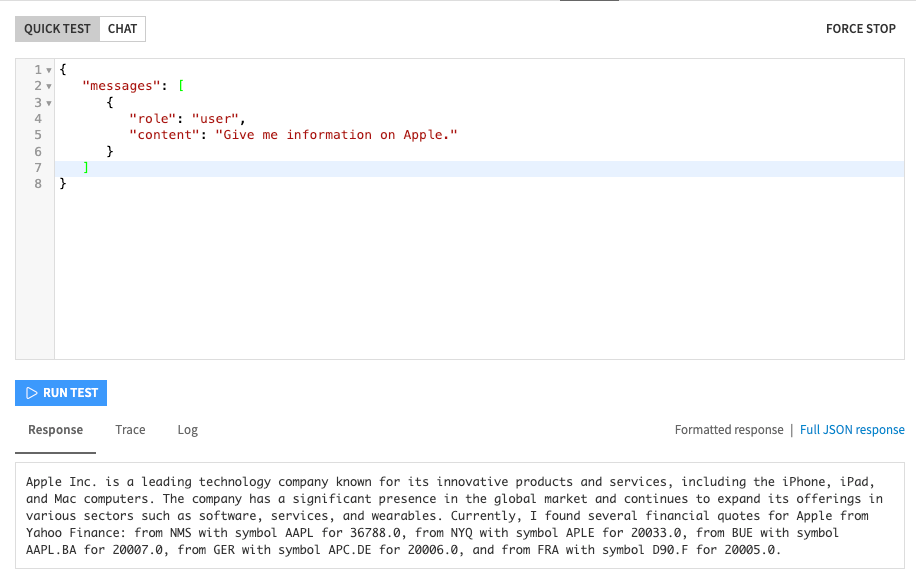
Fig. 1: Code Agent test.
Complete code
Here is the complete code of the Code Agent using an agent framework:
Code 7: Complete code of the Code Agent
import os
from dataiku.llm.python import BaseLLM
import yfinance as yf
from crewai import Agent, Task, Crew, LLM
from crewai.tools import tool


class MyLLM(BaseLLM):
    def __init__(self):
        pass

    def process(self, query, settings, trace):
        # Specify the Dataiku OpenAI-compatible public API URL, e.g., http://<DATAIKU_HOST>/public/api/projects/<PROJECT_KEY>/llms/openai/v1/
        BASE_URL = ""

        # Use your Dataiku API key instead of an OpenAI secret
        API_KEY = ""

        # Fill with your LLM ID - to get the list of LLM IDs, you can use dataiku.api_client().get_default_project().list_llms()
        LLM_ID = ""

        # Disable CrewAI telemetry if you have no usage of it
        os.environ['CREWAI_DISABLE_TELEMETRY'] = 'true'

        @tool("Get quotes from Yahoo Finance")
        def get_quotes(company: str) -> str:
            """
                This tool is used to retrieve quotes for a company from Yahoo Finance.
                The output is a text with a line per quote found, separated by a new line.

                :param company: str, the name of the company to retrieve quotes for.
            """
            message = f"No quote found for {company}"

            quotes = yf.Search(company, include_research=True).quotes
            if len(quotes) > 0:
                message = f"I found {len(quotes)} quote" + "s.\n" if len(quotes) >= 1 else ".\n"
                for quote in quotes:
                    message += f"from {quote['exchange']} with symbol {quote['symbol']} for {quote['score']}\n"

            return message

        chosen_llm = LLM(
            model=LLM_ID,
            api_key=API_KEY,
            base_url=BASE_URL,  # Optional custom endpoint
            temperature=0.7,
            max_tokens=4000,
            top_p=0.9,
            frequency_penalty=0.1,
            presence_penalty=0.1,
            stop=["END"],
            seed=42,  # For reproducible outputs
            stream=True,  # Enable streaming
            timeout=60.0,  # Request timeout in seconds
            max_retries=3,  # Maximum retry attempts
            logprobs=True,  # Return log probabilities
            top_logprobs=5,  # Number of most likely tokens
            reasoning_effort="medium"  # For o1 models: low, medium, high
        )

        financial_agent = Agent(
            role="Financial and economics Assistant",
            goal="Assist the user on specific tasks about finance and companies and answer queries",
            backstory="You are a financial assistant and you help the user "
                      "by answering questions on financial information about companies. "
                      "Do not assume any info. "
                      "To find the available financial quotes for the company, use a tool. "
                      "If you find several quotes, list all of them. "
                      "If you don't know, just say you don't know. "
                      "Answer with 3 or 4 sentences maximum and use a polite tone.",
            allow_delegation=False,
            llm=chosen_llm,
            tools=[get_quotes],
            verbose=True
        )

        financial_task = Task(
            description=(
                "1. Analyze and answer the question: {topic}."
                "2. Find the name of the company in the question. If there is no company name, stop working here and tell it in the answer."
                "3. Find the available financial quotes for the company from Yahoo Finance."
            ),
            expected_output="A well-written paragraph with 3 or 4 sentences maximum, "
                            "use a corporate tone.",
            agent=financial_agent,
        )

        crew = Crew(
            agents=[financial_agent],
            tasks=[financial_task]
        )

        iterations = 0
        while True:
            iterations += 1

            result = crew.kickoff(inputs={"topic": query["messages"][-1]["content"]})

            return {"text": result.raw}
Wrapping up
Congratulations! You now have a Code Agent that uses an agent framework, but still benefits from all Dataiku resources.