

Monitoring and Optimizing Disk Usage in Dataiku with the Datadir Footprint API
In this tutorial, you will learn how to use the Datadir Footprint API.
This API helps you in monitoring the size of your instance.
In a long-running instance, the size occupied by this instance could grow.
For example, there might be some unused Code Environments, Model Cache, Code Studio Templates, etc.
Obviously, this information can be found by using Dataiku and by looking in every location.
But it’s cumbersome and a waste of time.
The Datadir Footprint API helps you to find quickly where you need to pay attention to gain space.
Prerequisites
Dataiku >= 14.2
Access to a Dataiku instance with the “Administration” permissions
Getting the size of the directories
To get the size of the directories, you first need to obtain a handle to analyze the footprint, as shown in Code 1.
import dataiku
import dataikuapi
from dataikuapi.dss.data_directories_footprint import DSSDataDirectoriesFootprint, Footprint


client: dataikuapi.DSSClient = dataiku.api_client()
foot_print: DSSDataDirectoriesFootprint = client.get_data_directories_footprint()
Once the handle is obtained, you can use one of the following methods to compute the different sizes of the directories:
compute_global_only_footprint(): which computes the size of the instance-wide directories like Code Environment, Plugins, Libraries, …compute_project_footprint(): which computes the size of directories associated with a specific project.compute_unknown_footprint(): which computes the size of directories that are not linked to Dataiku.compute_all_dss_footprint(): which computes all directories’ footprint (including project ones).
For example, if you need to investigate which global directory is growing, you can enter the following code:
foot_print_global: Footprint = foot_print.compute_global_only_footprint()
print(foot_print_global.human_readable_size)
This will print the size of all global directories. footPrintGlobal contains all the necessary information,
so if you want more details, you can iterate on it,
as demonstrated in Code 3.
def print_details(data: Footprint) -> None:
    """
    Print the size of all directories contained in data
    Args:
        data:
    """
    for rep in data.details:
        print(rep, " : ", Footprint(data.details.get(rep)).human_readable_size)

print_details(foot_print_global)
And you can also iterate on the details.
code_envs: Footprint = Footprint(foot_print_global.get('codeEnvs'))
print_details(code_envs)
Using the API
On a long-running instance, the codeEnv folder can consume a significant amount of disk space, due to unused Code Environments, for example. So let’s find which Code Environment takes up the most space by computing the size of each one and then sorting them. Code 5 shows how to do it.
from typing import List, Tuple


def get_size(data: Footprint) -> List[Tuple[str, int]]:
    """
    List the size of all directories contained in data
    Args:
        data: the parent folder

    Returns:
        the size of all directories contains in data
    """
    sizes: List[Tuple[str, int]] = list()
    for rep in data.details:
        sizes.append((rep, Footprint(data.details.get(rep)).size))
    ssizes: List[Tuple[str, int]] = sorted(sizes, key=lambda x: x[1], reverse=True)
    return ssizes
You can plot the results using Code 6. The resulting output can be seen in Fig. 1.
import matplotlib.pyplot as plt


def extract_first_n_element(a_list: List[Tuple[str, int]], size: int = 20) -> Tuple[List[str], List[int]]:
    """
    Extract the first n element of a list of couple and return two lists
    Args:
        a_list: A list of couple
        size: number of elements to extract

    Returns:
        the list unboxed
    """
    list_env_name: List[str]
    list_env_size: List[int]

    list_env_name, list_env_size = [list(t) for t in zip(*a_list[:size])]
    return list_env_name, list_env_size


code_envs: Footprint = Footprint(foot_print_global.get('codeEnvs'))
print_details(code_envs)

top_10_code_env = extract_first_n_element(get_size(code_envs), 10)
plt.figure()
plt.bar(top_10_code_env[0], top_10_code_env[1])
plt.xticks(rotation=90)
plt.show()
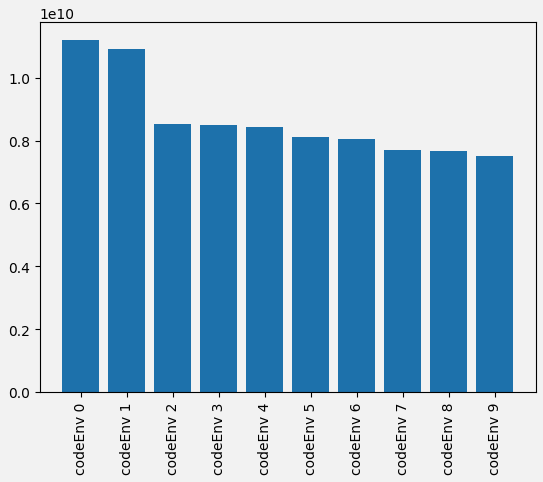
Figure 1: Plotting the most disk space consuming Code Environment.
Wrapping up
In this tutorial, we used the Datadir Footprint API to monitor disk usage in your Dataiku instance. You can use these insights to optimize storage, clean up unused resources, and maintain your Dataiku environment.
Here is the complete code for this tutorial:
monitoring.py
import dataiku
import dataikuapi
from dataikuapi.dss.data_directories_footprint import DSSDataDirectoriesFootprint, Footprint
from typing import List, Tuple
import matplotlib.pyplot as plt


def extract_first_n_element(a_list: List[Tuple[str, int]], size: int = 20) -> Tuple[List[str], List[int]]:
    """
    Extract the first n element of a list of couple and return two lists
    Args:
        a_list: A list of couple
        size: number of elements to extract

    Returns:
        the list unboxed
    """
    list_env_name: List[str]
    list_env_size: List[int]

    list_env_name, list_env_size = [list(t) for t in zip(*a_list[:size])]
    return list_env_name, list_env_size


def get_size(data: Footprint) -> List[Tuple[str, int]]:
    """
    List the size of all directories contained in data
    Args:
        data: the parent folder

    Returns:
        the size of all directories contains in data
    """
    sizes: List[Tuple[str, int]] = list()
    for rep in data.details:
        sizes.append((rep, Footprint(data.details.get(rep)).size))
    ssizes: List[Tuple[str, int]] = sorted(sizes, key=lambda x: x[1], reverse=True)
    return ssizes


def print_details(data: Footprint) -> None:
    """
    Print the size of all directories contained in data
    Args:
        data:
    """
    for rep in data.details:
        print(rep, " : ", Footprint(data.details.get(rep)).human_readable_size)


client: dataikuapi.DSSClient = dataiku.api_client()
foot_print: DSSDataDirectoriesFootprint = client.get_data_directories_footprint()

foot_print_global: Footprint = foot_print.compute_global_only_footprint()
print(foot_print_global.human_readable_size)

print_details(foot_print_global)

code_envs: Footprint = Footprint(foot_print_global.get('codeEnvs'))
print_details(code_envs)

top_10_code_env = extract_first_n_element(get_size(code_envs), 10)
plt.figure()
plt.bar(top_10_code_env[0], top_10_code_env[1])
plt.xticks(rotation=90)
plt.show()
Reference documentation
Classes
|
Entry point for the DSS API client |
|
Handle to analyze the footprint of data directories |
Helper class to access values of the data directories footprint |
Functions
|
Lists all the DSS data directories footprints, returning directories size in bytes. |
|
Compute the global data directories footprints, returning directories size in bytes. |
|
Lists data directories footprints for the given project, returning directories size in bytes. |
|
Lists the unknown data directories footprints, returning directories size in bytes Unknown directories are any directory that does not belong to DSS |
Drill down into this data directories footprint |
|
|
Get the size of this footprint item |
Get a printable size of this footprint item |