

Hint for writing tutorials with Markdown syntax#
Comment#
In case you need, you can comment a line with
% This is a comment.
References#
Internal link#
If you need to reference a header/figure/code in your document, first create a target in your document by using the following:
(target)=
#### Header example
Header example#
Then reference it with:
Link |
Code |
|---|---|
|
|
|
|
|
|
|
For figures and code, you can also use the configurable options.
HTML Link#
Link |
Code |
|---|---|
|
|
|
Link to an existing doc#
Link |
Code |
|---|---|
|
|
|
Link to Refdoc#
Link |
Code |
|---|---|
|
|
|
Figure and Code#
If you want to number your figure or code, you need to do it manually. We do not use automatic numbering as automatic numbering will be for the whole documentation without resetting the numbering by the document.
Figures#
A simple figure without any configuration is obtained by using the following:
{.image-popup}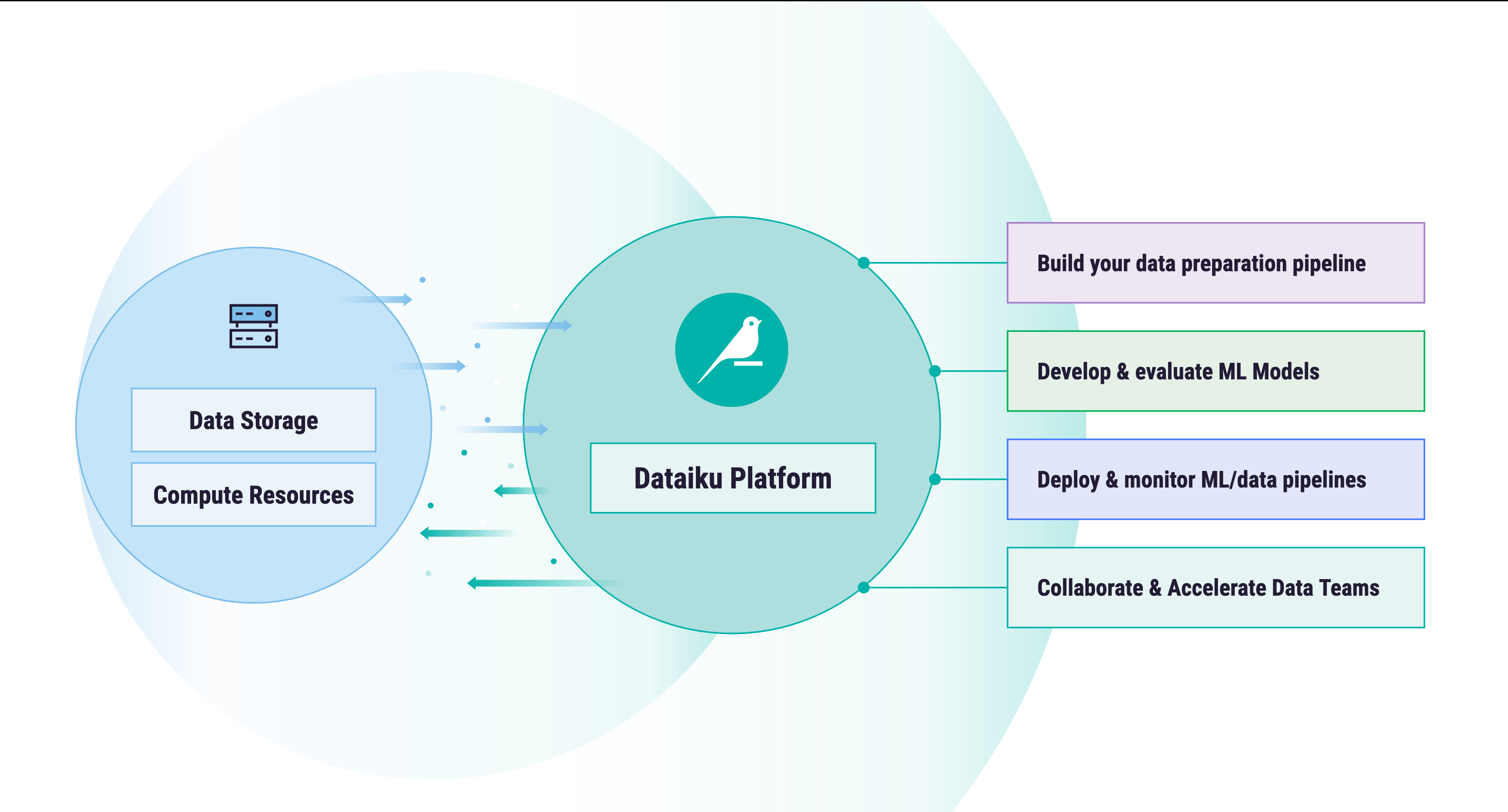
more advanced figure with configuration options
Figure 1: Here goes the caption#
This is obtained by using the following:
      ```{figure} /getting-started/intro-value/assets/dku-diagram.png
      :name: contributing_template_md_label
      :width: 100px

      Figure 1: Here goes the caption
      ```
then you can refer to the figure by using the
:name:defined in the figure block, like an internal link.
Code#
Inline-code:
example = TrueSyntax highlighting for long code
import dataiku

client = dataiku.api_client()
      ```python
      import dataiku

      client = dataiku.api_client()
      ```
Configurable code block
Code 1 – Code sample#1import dataiku 2 3client = dataiku.api_client()
This code sample can be referenced with the internal link reference syntax and is obtained with the following:
      ```{code-block} python
      :name: contributing_template_md_code_sample
      :caption: Code 1 -- Code sample
      :linenos:
      :emphasize-lines: 1,3

      import dataiku

      client = dataiku.api_client()
      ```
You can also use the
literalincludecode syntax```{literalinclude} /tutorials/devtools/project-libs-unit-tests/prepare.py :language: python :caption: Code 2 -- Included code :name: contributing_template_md_code_included :emphasize-lines: 1-7 :linenos: ```Code 2 – Included code#1import pandas as pd 2from datetime import datetime 3 4# Useful to de-normalize tenperature. 5# Check https://archive.ics.uci.edu/ml/datasets/bike+sharing+dataset for more details 6TEMP_MIN_C = -8.0 7TEMP_MAX_C = 39.0 8 9def with_temp_fahrenheit(df: pd.DataFrame, temp_col: str) -> pd.DataFrame: 10 """ 11 Denormalize temperature then convert it to Fahrenheit degrees. 12 13 Args: 14 df (pd.DataFrame): Input pandas DataFrame to chain on. 15 temp_col (str): DataFrame column name for normalized temperature. 16 17 Returns: 18 A pandas DataFrame with a new column called "temp_F" containing 19 de-normalized temperature in Fahrenheit degrees. 20 """ 21 df["temp_F"] = 1.8 * (TEMP_MIN_C+df[temp_col].astype(float) * (TEMP_MAX_C-TEMP_MIN_C)) + 32.0 22 return df 23 24def with_datetime(df: pd.DataFrame, 25 date_col: str, 26 hour_col: str) -> str: 27 """ 28 Create a proper datetime column. 29 30 Args: 31 df (pd.DataFrame): Input pandas DataFrame to chain on. 32 date_col (str) : column name in df containing date value (e.g. 2023-04-29) 33 hour_col (str): column name in df containing hour value (e.g. 21) 34 35 Returns: 36 A pandas DataFrame with a new column called "datetime" containing 37 date + hour information in ISO8601 format. 38 """ 39 40 df["datetime"] = (df[date_col] + ' ' + df[hour_col].astype(str)) \ 41 .apply(lambda x: datetime.strptime(x, "%Y-%m-%d %H")) \ 42 .apply(datetime.isoformat) 43 return df 44
You can also just include a function
Code 3 – Included code (partial inclusion)#def with_temp_fahrenheit(df: pd.DataFrame, temp_col: str) -> pd.DataFrame: """ Denormalize temperature then convert it to Fahrenheit degrees. Args: df (pd.DataFrame): Input pandas DataFrame to chain on. temp_col (str): DataFrame column name for normalized temperature. Returns: A pandas DataFrame with a new column called "temp_F" containing de-normalized temperature in Fahrenheit degrees. """ df["temp_F"] = 1.8 * (TEMP_MIN_C+df[temp_col].astype(float) * (TEMP_MAX_C-TEMP_MIN_C)) + 32.0 return df
        ```{literalinclude} /tutorials/devtools/project-libs-unit-tests/prepare.py
        :language: python
        :caption: Code 3 -- Included code (partial inclusion)
        :name: contributing_template_md_code_included_partial
        :emphasize-lines: 2-12
        :pyobject: with_temp_fahrenheit
        ```
Dropdowns#
You can use a dropdown when you want to have an expandable section in your article. This is especially useful with code-blocks in the conclusion or as an inclusion as reference.
````{dropdown} [template-md in a dropdown](./template-md.md)
```{literalinclude} template-md.md
:language: markdown
```
````
template-md in a dropdown
```{eval-rst}
:orphan:
```

# Template for writing a tutorial (Your title here)

```{eval-rst}
.. meta::
  :description: One sentence summary on the purpose of this documentation file.
```

A small introduction/summary text

## Prerequisites
* Dataiku version, a disclaimer if the tutorial doesn't work on Dataiku Cloud
* User permissions (both connection and project level)
* Python version and packages version
* Expected initial state, e.g.:
  * existing project
  * dataset
  * models
  * knowledge

## Introduction/context (you can change the title if you need)
What problems solve in your tutorial?

## Step 1

### Sub-step if needed.

## Step 2

## .../...

## Complete code (if applicable)

## Wrapping up/Conclusion

## Reference documentation

### Classes
```{eval-rst}
.. autosummary::
  dataikuapi.DSSClient
```

### Functions
```{eval-rst}
.. autosummary::
  ~dataikuapi.DSSClient.get_default_project
```
You can also have the dropdown opened by default by adding :open: to the first line.
````{dropdown} [template-md.md](./template-md.md)
:open:
```{literalinclude} template-md.md
:language: markdown
```
````
Tables#
For simple tables, use the Markdown syntax.
Link |
Code |
|---|---|
|
|
|
is obtained with the following code:
| Link                             | Code                                    |
|----------------------------------|-----------------------------------------|
| {ref}`target`                    | ```{ref}`target` ```                    |
| {ref}`Alternative text <target>` | ```{ref}`Alternative text <target>` ``` |
You can right-align a column with ---: or center with :---:.
If you need a more advanced table, you have to fall back to the rst syntax:
Header row, column 1 (header rows optional) |
Header 2 |
Header 3 |
Header 4 |
|---|---|---|---|
body row 1, column 1 |
column 2 |
column 3 |
column 4 |
body row 2 |
Cells may span columns. |
||
body row 3 |
Cells may span rows. |
|
|
body row 4 |
|||
body row 5 |
Cells may also be
empty: |
||
+------------------------+------------+----------+----------+
| Header row, column 1   | Header 2   | Header 3 | Header 4 |
| (header rows optional) |            |          |          |
+========================+============+==========+==========+
| body row 1, column 1   | column 2   | column 3 | column 4 |
+------------------------+------------+----------+----------+
| body row 2             | Cells may span columns.          |
+------------------------+------------+---------------------+
| body row 3             | Cells may  | - Table cells       |
+------------------------+ span rows. | - contain           |
| body row 4             |            | - body elements.    |
+------------------------+------------+----------+----------+
| body row 5             | Cells may also be     |          |
|                        | empty: ``-->``        |          |
+------------------------+-----------------------+----------+
Or with list-table (which works also with code)
Heading row 1, column 1 |
Heading row 1, column 2 |
Heading row 1, column 3 |
|---|---|---|
import dataiku

client = dataiku.api_client()
|
Row 1, column 3 |
|
Row 2, column 1 |
Row 2, column 2 |
Row 2, column 3 |
.. list-table:: Title
  :name: contributing_template_md_table
  :widths: 4 1 3
  :header-rows: 1

  * - Heading row 1, column 1
    - Heading row 1, column 2
    - Heading row 1, column 3
  * - .. code-block:: python

        import dataiku

        client = dataiku.api_client()

    -
    - Row 1, column 3
  * - Row 2, column 1
    - Row 2, column 2
    - Row 2, column 3
Admonitions#
You can use all admonitions defined in Sphinx
(topic, admonition, attention, caution, danger, error,
hint, important, note, seealso, tip, and warning).
These admonitions are renderer like the following:
admonition_title
Lorem ipsum dolor sit amet consectetur adipisicing elit. Accusamus, sunt voluptatum tenetur libero nulla esse veritatis accusantium earum commodi hic voluptatem officia culpa optio atque. Quaerat sed quibusdam ratione nam.
Attention
Lorem ipsum dolor sit amet consectetur adipisicing elit. Accusamus, sunt voluptatum tenetur libero nulla esse veritatis accusantium earum commodi hic voluptatem officia culpa optio atque. Quaerat sed quibusdam ratione nam.
Caution
Lorem ipsum dolor sit amet consectetur adipisicing elit. Accusamus, sunt voluptatum tenetur libero nulla esse veritatis accusantium earum commodi hic voluptatem officia culpa optio atque. Quaerat sed quibusdam ratione nam.
Danger
Lorem ipsum dolor sit amet consectetur adipisicing elit. Accusamus, sunt voluptatum tenetur libero nulla esse veritatis accusantium earum commodi hic voluptatem officia culpa optio atque. Quaerat sed quibusdam ratione nam.
Error
Lorem ipsum dolor sit amet consectetur adipisicing elit. Accusamus, sunt voluptatum tenetur libero nulla esse veritatis accusantium earum commodi hic voluptatem officia culpa optio atque. Quaerat sed quibusdam ratione nam.
Hint
Lorem ipsum dolor sit amet consectetur adipisicing elit. Accusamus, sunt voluptatum tenetur libero nulla esse veritatis accusantium earum commodi hic voluptatem officia culpa optio atque. Quaerat sed quibusdam ratione nam.
Important
Lorem ipsum dolor sit amet consectetur adipisicing elit. Accusamus, sunt voluptatum tenetur libero nulla esse veritatis accusantium earum commodi hic voluptatem officia culpa optio atque. Quaerat sed quibusdam ratione nam.
Note
Lorem ipsum dolor sit amet consectetur adipisicing elit. Accusamus, sunt voluptatum tenetur libero nulla esse veritatis accusantium earum commodi hic voluptatem officia culpa optio atque. Quaerat sed quibusdam ratione nam.
See also
Lorem ipsum dolor sit amet consectetur adipisicing elit. Accusamus, sunt voluptatum tenetur libero nulla esse veritatis accusantium earum commodi hic voluptatem officia culpa optio atque. Quaerat sed quibusdam ratione nam.
Tip
Lorem ipsum dolor sit amet consectetur adipisicing elit. Accusamus, sunt voluptatum tenetur libero nulla esse veritatis accusantium earum commodi hic voluptatem officia culpa optio atque. Quaerat sed quibusdam ratione nam.
Warning
Lorem ipsum dolor sit amet consectetur adipisicing elit. Accusamus, sunt voluptatum tenetur libero nulla esse veritatis accusantium earum commodi hic voluptatem officia culpa optio atque. Quaerat sed quibusdam ratione nam.
Mathematics and formula#
Sphinx uses \(\LaTeX\) notation to render the formula.
You can use the $ sign to delimitate an inline equation.
For example, this inline equation \(e=mc^2\) is rendered with $e=mc^2$ or {math}`e=mc^2` .
You can also have equations block with the $$ symbol:
  $$
  \begin{aligned}
    a & = b\\
    a^2 & = ab\\
    a^2 - b^2 & = ab - b^2\\
    (a - b)(a + b) & = b(a - b)\\
  \end{aligned}
  $$
And with the {math} for numbering, see (1)
    ```{math}
    :label: contributing_template_md_math_absurd2

    \begin{aligned}
      x^2 - x^2 & = x^2 - x^2\\
      x (x - x) & = (x + x) (x - x)\\
    \end{aligned}
    ```