

Using Generative Adversarial Networks to generate synthetic images
In this tutorial, we will guide you through the process of building, training, and deploying a Generative Adversarial Network (GAN) to generate synthetic images. You will learn how to set up your environment, prepare your data, construct both the generator and discriminator models, and use MLflow for experiment tracking and model deployment.
Introduced by Ian Goodfellow et al. in 2014, Generative Adversarial Networks (GANs) are common deep learning networks used for tasks such as image generation, image translation, image super-resolution, and data augmentation. In this tutorial, we will use code notebooks to design, train, and deploy a Deep Convolutional GAN (DCGAN) to create synthetic images.
Today’s most popular deep learning libraries, PyTorch and TensorFlow, both have excellent reference material and tutorials on a variety of topics. Today, we will be leveraging a modified version of TensorFlow’s Deep Convolutional Generative Adversarial Network tutorial.
Prerequisites
Dataiku >= 12.0
Python >= 3.9
A code environment with the following packages:
tensorflow >=2.16,<2.21
mlflow==2.17.2
mlflow[extras]
Getting Started
To get started, create a new Dataiku project. Go to the Code (</>) menu, select Notebooks (G+N), and create a notebook. When prompted, select Write your own and choose Python. Be sure to select a code environment that contains the packages defined in the prerequisites section, and the appropriate Execution environment (if necessary) before clicking Create.
Note
TensorFlow automatically uses GPUs when available. If your execution and code environments are configured correctly, no further action is required.
Importing the required packages
We will start by importing the packages we will use throughout this tutorial.
import dataiku
from datetime import datetime
import matplotlib.pyplot as plt
import pandas as pd
import tensorflow as tf
To make our code cleaner and easier to read, we can also import the specific TensorFlow layers, losses, and optimizers we want to use.
from tensorflow.keras.layers import Input, Dense, BatchNormalization, LeakyReLU, Conv2DTranspose, Dropout, Flatten, \
    Dense, Conv2D, Reshape
from tensorflow.keras.losses import BinaryCrossentropy
from tensorflow.keras.optimizers import Adam
Creating our training images dataset
We will be using the Fashion MNIST image dataset throughout this tutorial.
Structurally identical to the more traditional MNIST dataset,
the Fashion MNIST dataset consists of 70,000 28x28 pixel (single-channel) images of different types of clothing.
This dataset is built into TensorFlow Datasets,
making it easy for us to quickly download and create our training datasets.
To download the dataset, call the load_data() function from the tf.keras.datasets.fashion_mnist class,
as done in the code below.
Alternatively, we can import the dataset using the download recipe and retrieve the images using a managed folder. A walkthrough of this process can be found in the Image Classification with Code tutorial.
# Download the images to our notebook
(training_images, _), (_, _) = tf.keras.datasets.fashion_mnist.load_data()

# Reshape and normalize the values
training_images = training_images.reshape(training_images.shape[0], 28, 28, 1)
training_images = training_images / 256
Now that we’ve created our training_images dataset, let’s define some Hyperparameters to use.
Feel free to experiment with the BATCH_SIZE and EPOCHS parameter values.
# Define our hyperparameters
BATCH_SIZE = 256
EPOCHS = 40
DROPOUT = 0.30
IMAGE_SHAPE = [28, 28, 1]  # Channel-last orientation
NOISE_SHAPE = [100]  # Noise shape is the input size to the generator
NUM_IMAGES = training_images.shape[0]  # Optional to help make code cleaner
With our BATCH_SIZE now defined, we can take one final step to randomize and pre-batch our training dataset.
training_dataset = tf.data.Dataset.from_tensor_slices(training_images).shuffle(NUM_IMAGES).batch(BATCH_SIZE)
Creating the Models
Generative Adversarial Networks typically consist of two neural networks, a generator and a discriminator. These networks are closely coupled in architecture and are designed to be trained side-by-side, working against each other. Our generator will start with a noise input and be trained to generate images similar to Fashion MNIST images. Our discriminator is then trained to differentiate between genuine and generated images. This process can be repeated, with continued training/refinement of the generator and discriminator until the desired performance is achieved.
Creating the Generator
We will start by building the generator using the Keras Sequential API.
Starting with the NOISE_SHAPE input,
we will perform three convolutional transpositions (and subsequent activation and normalization)
to produce our 28x28x1 clothing images.
# Create the Generator model
generator = tf.keras.Sequential()

# Add the Input layer
generator.add(Input(shape=NOISE_SHAPE))
# Preparation Layers
generator.add(Dense(7 * 7 * 128))
generator.add(Reshape([7, 7, 128]))  # Reshape to 128 7x7 'images'
generator.add(BatchNormalization())

# First convolutional transposition
generator.add(Conv2DTranspose(128, (5, 5), strides=1, padding='same'))
generator.add(LeakyReLU())
generator.add(BatchNormalization())

# Second convolutional transposition
generator.add(Conv2DTranspose(64, (5, 5), strides=2, padding='same'))
generator.add(LeakyReLU())
generator.add(BatchNormalization())

# Final convolutional transposition - produces 28x28x1 images
generator.add(Conv2DTranspose(1, (5, 5), strides=2, padding='same', activation='tanh'))
We can quickly verify that our image is the correct size by generating a random noise tensor
and calling the predict() function.
Since we haven’t trained our image, we should only see noise.
noise = tf.random.normal([1, NOISE_SHAPE[0]])  # create a 100 element tensor
img = generator.predict(noise)  # generate a single image

# Plot the image (in grayscale)
plt.imshow(img[0], cmap='gray')
Creating the Discriminator
As with the generator, our discriminator model will be built using the Keras Sequential API.
Starting with the IMAGE_SHAPE input, we will perform two convolutions, followed by activations and dropouts,
to generate a binary (fake/real) classification.
# Create the Discriminator model
discriminator = tf.keras.Sequential()

# Add the Input layer
discriminator.add(Input(shape=IMAGE_SHAPE))

# First Convolution
discriminator.add(Conv2D(64, (5, 5), strides=2, padding='same'))
discriminator.add(LeakyReLU())
discriminator.add(Dropout(DROPOUT))

# Second Convolution
discriminator.add(Conv2D(128, (5, 5), strides=2, padding='same'))
discriminator.add(LeakyReLU())
discriminator.add(Dropout(DROPOUT))

# Flatten out latent space and add our final (Dense) layer
discriminator.add(Flatten())
discriminator.add(Dense(1))
As with the generator, we can test our untrained discriminator by calling the discriminator’s predict() function.
prediction = discriminator.predict(img)
print(prediction)  # To show the predicted value
Defining the Model Training Process
With our models now defined, we can create the functions needed to train them. To define our custom loss functions, we build upon TensorFlow’s BinaryCrossentropy class and calculate our loss functions so that, over epochs, our generator gets better and better at creating images that the discriminator considers to be true. Since our discriminator classifies generated images as 0 and real images as 1, we will calculate their losses with respect to those values. For the generator, however, we want to calculate the losses against a prediction of 1 (real image).
# Define the Generator and Discriminator loss functions
def discriminator_loss(real_data, gen_data):
    bce = BinaryCrossentropy(from_logits=True)

    real_loss = bce(tf.ones_like(real_data), real_data)
    gen_loss = bce(tf.zeros_like(gen_data), gen_data)

    total_loss = real_loss + gen_loss

    return total_loss


def generator_loss(gen_image):
    bce = BinaryCrossentropy(from_logits=True)
    gen_loss = bce(tf.ones_like(gen_image), gen_image)

    return gen_loss
With our loss functions defined, we can now start defining the actual training step: generate a noise tensor, create GradientTape objects for both the generator and the discriminator, generate images and classifications, then apply the necessary gradient calculations and updates.
# Define our optimizers for each model
gen_optimizer = Adam(1e-4)
disc_optimizer = Adam(1e-4)


# Define an individual training step
def train_step(images):
    # Generate noise tensors
    noise = tf.random.normal([BATCH_SIZE, NOISE_SHAPE[0]])

    # Use GradientTape objects to manually define  training step
    with tf.GradientTape() as gen_tape, tf.GradientTape() as disc_tape:
        generated_images = generator(noise, training=True)

        real_out = discriminator(images, training=True)
        gen_out = discriminator(generated_images, training=True)

        gen_loss = generator_loss(gen_out)
        disc_loss = discriminator_loss(real_out, gen_out)

    gen_grads = gen_tape.gradient(gen_loss, generator.trainable_variables)
    disc_grads = disc_tape.gradient(disc_loss, discriminator.trainable_variables)

    gen_optimizer.apply_gradients(zip(gen_grads, generator.trainable_variables))
    disc_optimizer.apply_gradients(zip(disc_grads, discriminator.trainable_variables))
We are ready to train our models. Since we’ve already batched our training data, we can simply iterate over our batches for every epoch. The weights will automatically be updated after each cycle, so no additional functions or definitions are required.
for epoch in range(EPOCHS):
    print(f"training run {epoch} of {EPOCHS}")
    for batch in training_dataset:
        train_step(batch)
Once training is complete, you can use the predict() calls for both the generator and discriminator.
Using MLFlow to store the models
To access our models outside the notebook, we will need to create a model artifact. Create a Managed folder in your project to store the experiments and model artifacts. Note its ID. Once the MLFlow handler has been created, we will integrate our training functions with hyperparameter and metrics logging.
# create project and folder objects
project = dataiku.api_client().get_default_project()
model_folder = project.get_managed_folder('<YOUR_MANAGED_FOLDER_ID>')


# Define helper functions
def now_str() -> str:
    return datetime.now().strftime("%Y%m%d%H%M%S")


# define MLFlow parameters
MLFLOW_CODE_ENV_NAME = '<YOUR_CODE_ENV_NAME>'
PREDICTION_TYPE = 'OTHER'
EXPERIMENT_FOLDER_ID = '<YOUR_MANAGED_FOLDER_ID>'

with project.setup_mlflow(managed_folder=model_folder) as mlflow_handle:
    mlflow_handle.set_experiment('Training')
To help improve the development of our models, let’s rewrite our train_step() to log our generator
and discriminator losses as metrics.
There is no change to the train function, as we will log our experiment hyperparameters with each run.
    def train_step(images):
        # Generate noise tensors
        noise = tf.random.normal([BATCH_SIZE, NOISE_SHAPE[0]])

        # Use GradientTape objects to manually define  training step
        with tf.GradientTape() as gen_tape, tf.GradientTape() as disc_tape:
            generated_images = generator(noise, training=True)

            real_out = discriminator(images, training=True)
            gen_out = discriminator(generated_images, training=True)

            gen_loss = generator_loss(gen_out)
            disc_loss = discriminator_loss(real_out, gen_out)

            # Log the losses
            mlflow_handle.log_metric("generator_loss", gen_loss)
            mlflow_handle.log_metric("discriminator_loss", disc_loss)

        gen_grads = gen_tape.gradient(gen_loss, generator.trainable_variables)
        disc_grads = disc_tape.gradient(disc_loss, discriminator.trainable_variables)

        gen_optimizer.apply_gradients(zip(gen_grads, generator.trainable_variables))
        disc_optimizer.apply_gradients(zip(disc_grads, discriminator.trainable_variables))


    # Add our train function
    def train(training_dataset, epochs):
        for epoch in range(epochs):
            for batch in training_dataset:
                train_step(batch)
We can now write the code for a training run, which should include logging our experiment hyperparameters, training the models, and logging the Keras model objects. Finally, we will set our run inference info, which will allow us to create our model objects in the flow.
    with mlflow_handle.start_run(run_name="<YOUR_EXP_NAME>") as run:
        mlflow_handle.log_param('Batch Size', BATCH_SIZE)
        mlflow_handle.log_param('Epochs', EPOCHS)
        mlflow_handle.log_param('Noise Shape', NOISE_SHAPE)
        mlflow_handle.log_param('Image Shape', IMAGE_SHAPE)

        # Define the paths to save the models
        generator_path = f"Generator-{now_str()}"
        discriminator_path = f"Discriminator-{now_str()}"

        train(training_dataset, EPOCHS)

        # Log the models
        mlflow_handle.keras.log_model(generator, artifact_path=generator_path)
        mlflow_handle.keras.log_model(discriminator, artifact_path=discriminator_path)

        # set the Run Inference Info
        mlflow_ext = project.get_mlflow_extension()
        mlflow_ext.set_run_inference_info(run_id=run._info.run_id,
                                          prediction_type=PREDICTION_TYPE,
                                          code_env_name=MLFLOW_CODE_ENV_NAME)
Deploying our models
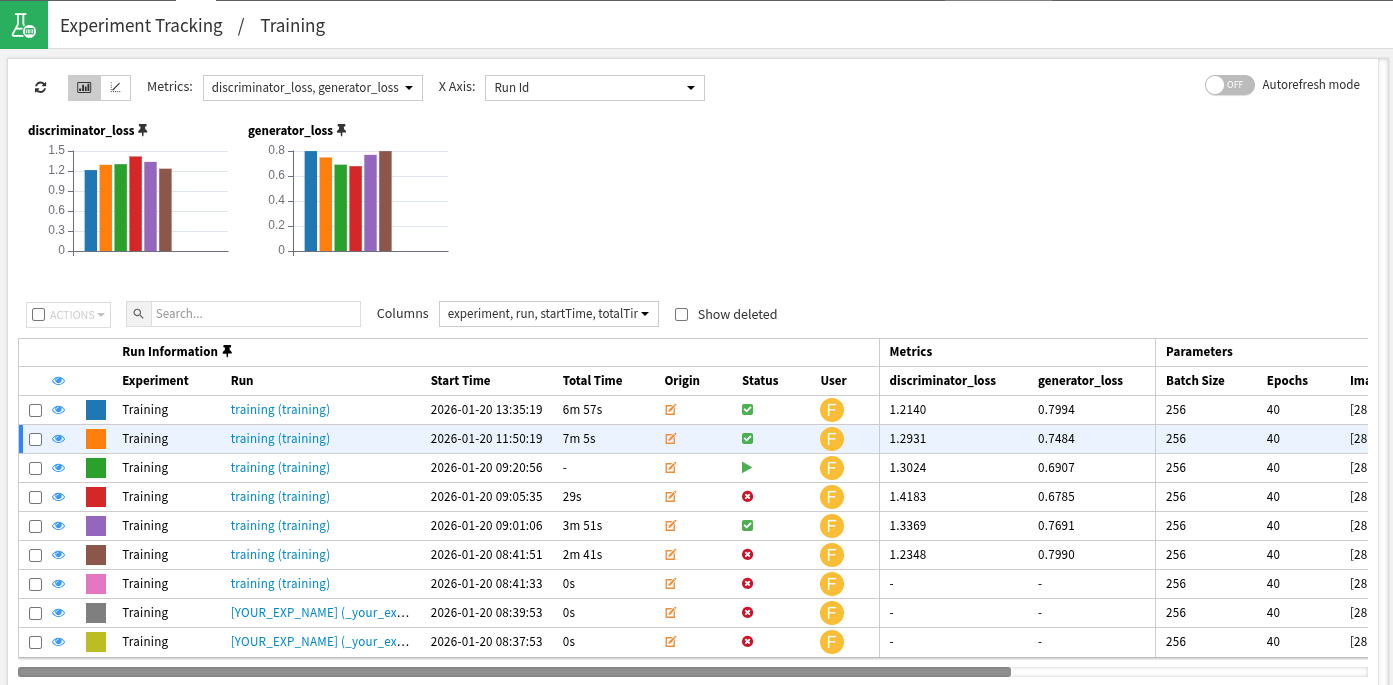
We can now view our experiments in the Experiment Tracking section of our project. Each experiment and run can now be viewed individually. To deploy our models, click into a specific run and select the Deploy a model button under the Models section. You will then be prompted to select the specific model and code environment.
Conclusion
In this tutorial, you saw how to train a generative adversarial network to generate synthetic Fashion MNIST images. You also saw how to create and log the MLFlow model objects and add them to a project flow.
Here is the complete code of the Code Agent using an agent framework:
Complete code of the tutorial
import dataiku
from datetime import datetime
import matplotlib.pyplot as plt
import pandas as pd
import tensorflow as tf

from tensorflow.keras.layers import Input, Dense, BatchNormalization, LeakyReLU, Conv2DTranspose, Dropout, Flatten, \
    Dense, Conv2D, Reshape
from tensorflow.keras.losses import BinaryCrossentropy
from tensorflow.keras.optimizers import Adam

# Download the images to our notebook
(training_images, _), (_, _) = tf.keras.datasets.fashion_mnist.load_data()

# Reshape and normalize the values
training_images = training_images.reshape(training_images.shape[0], 28, 28, 1)
training_images = training_images / 256

# Define our hyperparameters
BATCH_SIZE = 256
EPOCHS = 40
DROPOUT = 0.30
IMAGE_SHAPE = [28, 28, 1]  # Channel-last orientation
NOISE_SHAPE = [100]  # Noise shape is the input size to the generator
NUM_IMAGES = training_images.shape[0]  # Optional to help make code cleaner

training_dataset = tf.data.Dataset.from_tensor_slices(training_images).shuffle(NUM_IMAGES).batch(BATCH_SIZE)

# Create the Generator model
generator = tf.keras.Sequential()

# Add the Input layer
generator.add(Input(shape=NOISE_SHAPE))
# Preparation Layers
generator.add(Dense(7 * 7 * 128))
generator.add(Reshape([7, 7, 128]))  # Reshape to 128 7x7 'images'
generator.add(BatchNormalization())

# First convolutional transposition
generator.add(Conv2DTranspose(128, (5, 5), strides=1, padding='same'))
generator.add(LeakyReLU())
generator.add(BatchNormalization())

# Second convolutional transposition
generator.add(Conv2DTranspose(64, (5, 5), strides=2, padding='same'))
generator.add(LeakyReLU())
generator.add(BatchNormalization())

# Final convolutional transposition - produces 28x28x1 images
generator.add(Conv2DTranspose(1, (5, 5), strides=2, padding='same', activation='tanh'))

noise = tf.random.normal([1, NOISE_SHAPE[0]])  # create a 100 element tensor
img = generator.predict(noise)  # generate a single image

# Plot the image (in grayscale)
plt.imshow(img[0], cmap='gray')

# Create the Discriminator model
discriminator = tf.keras.Sequential()

# Add the Input layer
discriminator.add(Input(shape=IMAGE_SHAPE))

# First Convolution
discriminator.add(Conv2D(64, (5, 5), strides=2, padding='same'))
discriminator.add(LeakyReLU())
discriminator.add(Dropout(DROPOUT))

# Second Convolution
discriminator.add(Conv2D(128, (5, 5), strides=2, padding='same'))
discriminator.add(LeakyReLU())
discriminator.add(Dropout(DROPOUT))

# Flatten out latent space and add our final (Dense) layer
discriminator.add(Flatten())
discriminator.add(Dense(1))

prediction = discriminator.predict(img)
print(prediction)  # To show the predicted value


# Define the Generator and Discriminator loss functions
def discriminator_loss(real_data, gen_data):
    bce = BinaryCrossentropy(from_logits=True)

    real_loss = bce(tf.ones_like(real_data), real_data)
    gen_loss = bce(tf.zeros_like(gen_data), gen_data)

    total_loss = real_loss + gen_loss

    return total_loss


def generator_loss(gen_image):
    bce = BinaryCrossentropy(from_logits=True)
    gen_loss = bce(tf.ones_like(gen_image), gen_image)

    return gen_loss


# Define our optimizers for each model
gen_optimizer = Adam(1e-4)
disc_optimizer = Adam(1e-4)


# Define an individual training step
def train_step(images):
    # Generate noise tensors
    noise = tf.random.normal([BATCH_SIZE, NOISE_SHAPE[0]])

    # Use GradientTape objects to manually define  training step
    with tf.GradientTape() as gen_tape, tf.GradientTape() as disc_tape:
        generated_images = generator(noise, training=True)

        real_out = discriminator(images, training=True)
        gen_out = discriminator(generated_images, training=True)

        gen_loss = generator_loss(gen_out)
        disc_loss = discriminator_loss(real_out, gen_out)

    gen_grads = gen_tape.gradient(gen_loss, generator.trainable_variables)
    disc_grads = disc_tape.gradient(disc_loss, discriminator.trainable_variables)

    gen_optimizer.apply_gradients(zip(gen_grads, generator.trainable_variables))
    disc_optimizer.apply_gradients(zip(disc_grads, discriminator.trainable_variables))


for epoch in range(EPOCHS):
    print(f"training run {epoch} of {EPOCHS}")
    for batch in training_dataset:
        train_step(batch)

# create project and folder objects
project = dataiku.api_client().get_default_project()
model_folder = project.get_managed_folder('<YOUR_MANAGED_FOLDER_ID>')


# Define helper functions
def now_str() -> str:
    return datetime.now().strftime("%Y%m%d%H%M%S")


# define MLFlow parameters
MLFLOW_CODE_ENV_NAME = '<YOUR_CODE_ENV_NAME>'
PREDICTION_TYPE = 'OTHER'
EXPERIMENT_FOLDER_ID = '<YOUR_MANAGED_FOLDER_ID>'

with project.setup_mlflow(managed_folder=model_folder) as mlflow_handle:
    mlflow_handle.set_experiment('Training')


    def train_step(images):
        # Generate noise tensors
        noise = tf.random.normal([BATCH_SIZE, NOISE_SHAPE[0]])

        # Use GradientTape objects to manually define  training step
        with tf.GradientTape() as gen_tape, tf.GradientTape() as disc_tape:
            generated_images = generator(noise, training=True)

            real_out = discriminator(images, training=True)
            gen_out = discriminator(generated_images, training=True)

            gen_loss = generator_loss(gen_out)
            disc_loss = discriminator_loss(real_out, gen_out)

            # Log the losses
            mlflow_handle.log_metric("generator_loss", gen_loss)
            mlflow_handle.log_metric("discriminator_loss", disc_loss)

        gen_grads = gen_tape.gradient(gen_loss, generator.trainable_variables)
        disc_grads = disc_tape.gradient(disc_loss, discriminator.trainable_variables)

        gen_optimizer.apply_gradients(zip(gen_grads, generator.trainable_variables))
        disc_optimizer.apply_gradients(zip(disc_grads, discriminator.trainable_variables))


    # Add our train function
    def train(training_dataset, epochs):
        for epoch in range(epochs):
            for batch in training_dataset:
                train_step(batch)


    with mlflow_handle.start_run(run_name="<YOUR_EXP_NAME>") as run:
        mlflow_handle.log_param('Batch Size', BATCH_SIZE)
        mlflow_handle.log_param('Epochs', EPOCHS)
        mlflow_handle.log_param('Noise Shape', NOISE_SHAPE)
        mlflow_handle.log_param('Image Shape', IMAGE_SHAPE)

        # Define the paths to save the models
        generator_path = f"Generator-{now_str()}"
        discriminator_path = f"Discriminator-{now_str()}"

        train(training_dataset, EPOCHS)

        # Log the models
        mlflow_handle.keras.log_model(generator, artifact_path=generator_path)
        mlflow_handle.keras.log_model(discriminator, artifact_path=discriminator_path)

        # set the Run Inference Info
        mlflow_ext = project.get_mlflow_extension()
        mlflow_ext.set_run_inference_info(run_id=run._info.run_id,
                                          prediction_type=PREDICTION_TYPE,
                                          code_env_name=MLFLOW_CODE_ENV_NAME)