

Transductive Transfer Learning
Deep learning models are high-impact assets for extracting actionable intelligence and maximizing the value of organizational data; however, training these models can be time-consuming and expensive. This challenge is addressed by transfer learning, the general approach where a model trained on one task is “taught” to perform a second task. By repurposing an existing model and adjusting it to apply to a new domain or new task, users can accelerate time to value and reduce comparative cost.
Transductive transfer learning is a subdomain of transfer learning that applies to scenarios where the source and target tasks remain the same, but the domains differ. While the objective of the model is identical pre- and post-transfer, the model must learn to “re-map” its internal understanding of structure to fit the new domain’s patterns but maintain the intuition derived from the source data.
Fine-tuning is a popular transfer learning technique that is similar to transductive transfer learning. In fine-tuning, some or most of the layers within a pre-trained model are retrained on a new dataset in order to drive further performance gains on the source task. Generally, fine-tuning is best used when working with large, labeled target datasets. In contrast, transductive transfer learning is most useful when working with smaller target datasets and to lower overall computational costs.
This tutorial will be focused on implementing transductive transfer learning techniques, specifically adapter tuning. The starter model for this segment of the tutorial is distilBERT fine-tuned for sentiment analysis on financial news headlines. Our objective is to extend this model to classify reviews of fashion items on Amazon as positive, negative, or neutral. One of the challenges of domain adaptation for fine-tuned models is preserving the insights derived during the first fine-tuning exercise while adding pattern recognition for the new domain. Parameter-efficient fine-tuning (PEFT) is a fine-tuning method that updates a small subset of model parameters to fit new data without re-training the whole model. We will explore applications of PEFT within the context of this example.
Prerequisites
Dataiku >= 12.0
Python >= 3.11
A code environment with the following packages:
transformers
tokenizers
datasets
tensorflow
torch
pillow
peft
mlflow==2.22.1
tf-keras
- Expected initial state:
Base familiarity with neural networks and transformers
A pre-trained sentiment analysis classifier
Transductive Transfer Learning for Sentiment Analysis Across Domains
Defining a wrapper class for compatibility with MLFlow experiments
To store the fine-tuned distilBERT model as an MLFlow model,
we need to write a wrapper class that maps the HuggingFace model’s functionality
to MLFlow’s generalized pyfunc deployment format.
The pyfunc model expects a simple Python class with a defined predict method
that accepts standard input (such as a Pandas DataFrame) and returns standard output (such as a list or array).
The wrapper handles the necessary preprocessing (tokenization, converting text to PyTorch tensors)
and post-processing (converting logits back to a final prediction label) that the raw BERT model requires,
thus bridging the gap between the universal MLFlow API and the specialized PyTorch/HuggingFace library workflow.
This class can be defined within the notebook or code recipe where the model is fine-tuned,
or it can be stored as a Python file in the project library and imported as needed.
We have chosen to implement this class in a project library file, named bert_model_wrapper.py.
Go to the Code Menu and select the Libraries option. In the Library Editor, under the python folder,
create a file named: bert_model_wrapper.py. Then copy/paste the code below, which is the wrapper explained before.
import mlflow
import torch
import pandas as pd

class BertModelWrapper(mlflow.pyfunc.PythonModel):
    def __init__(self, model, tokenizer):
        self.model = model
        self.tokenizer = tokenizer

    def load_context(self, context):
        pass

    def preprocess(self, input_row):
        tokens = self.tokenizer(input_row['text'], return_tensors='pt', truncation=True, padding=True)
        return tokens

    def predict(self, context, model_input: pd.DataFrame):
        text_list = model_input['text'].tolist()
        tokens = self.tokenizer(text_list, return_tensors='pt', truncation=True, padding=True)

        with torch.no_grad():
            self.model.eval()
            outputs = self.model(**tokens)
            logits = outputs.logits
            predictions = torch.argmax(logits, dim=1).cpu().numpy()

        return predictions.tolist()
Creating the prerequisite objects
Once you have split the amazon_fashion_reviews dataset into three parts (train, validation and test),
select the train and validation datasets, then select the managed folder that contains the pre-trained model.
Create a Code Recipe (Python), which will output two objects: a managed folder (for storing the new artifact),
and a saved model to store the result of the transfer learning.
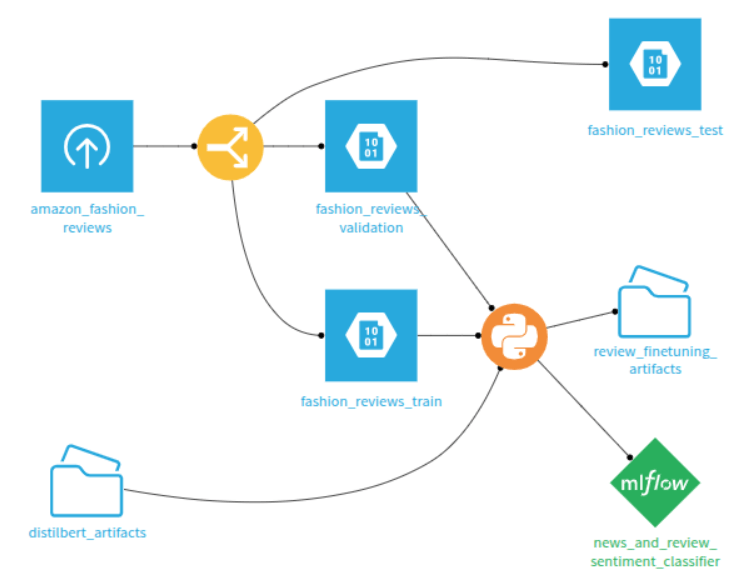
Figure 1: Code recipe creation.
The subsequent steps in this tutorial all describe code to include in the code recipe as defined in the flow. Alternatively, this code can be used for model development solely in a Jupyter notebook.
Importing the required packages
The first thing you need to do is to import all necessary packages, as shown in the code below:
# For interacting with the Dataiku API + loading data
import dataiku
from dataiku import pandasutils as pdu
import pandas as pd
import numpy as np
# For fine-tuning
from datasets import Dataset
from transformers import AutoTokenizer, TrainingArguments, Trainer
import torch
import numpy as np
import pandas as pd
import logging
from dataikuapi.dss.ml import DSSPredictionMLTaskSettings
from sklearn.metrics import accuracy_score
from mlflow.models import infer_signature
from peft import LoraConfig, get_peft_model, TaskType
import pickle
from sklearn.metrics import accuracy_score
# Import custom wrapper class and MLFlow for integrating model into flow
from bert_model_wrapper import BertModelWrapper
import mlflow
Setting the variables
We start by instantiating a connection with the Dataiku project and defining the configuration details for experiment tracking.
# Instantiate the connection with the project
client = dataiku.api_client()
project = client.get_default_project()

# Set model and MLFlow tracking variables
MLFLOW_CODE_ENV_NAME = "devadv-transfer"
XP_TRACKING_FOLDER_ID = "oB4iw9q8"
sm_name = "transfer"
folder = project.get_managed_folder(odb_id=XP_TRACKING_FOLDER_ID)
mlflow_handle = project.setup_mlflow(managed_folder=folder)
mlflow_extension = mlflow_handle.project.get_mlflow_extension()
Loading and preparing the Datasets
The code reads the raw training and validation datasets from Dataiku,
converts them into the HuggingFace dataset format, and initializes the tokenizer.
The preprocess_function applies tokenization, truncation,
and padding, transforming the raw text into numerical inputs suitable for the DistilBERT model.
# Read recipe inputs
reviews_train = dataiku.Dataset("fashion_reviews_train")
reviews_train_df = reviews_train.get_dataframe()
reviews_validation = dataiku.Dataset("fashion_reviews_validation")
reviews_validation_df = reviews_validation.get_dataframe()

# Convert dataframes to HuggingFace datasets
reviews_train_ds = Dataset.from_pandas(reviews_train_df)
reviews_validation_ds = Dataset.from_pandas(reviews_validation_df)

# Prepare text data
tokenizer = AutoTokenizer.from_pretrained("distilbert-base-uncased")


def preprocess_function(examples):
    return tokenizer(
        examples["text"],
        truncation=True,
        padding=True
    )


tokenized_train = reviews_train_ds.map(
    preprocess_function,
    batched=True,
    batch_size=32
)
tokenized_validation = reviews_validation_ds.map(
    preprocess_function,
    batched=True,
    batch_size=32
)
Loading the pre-trained model
The artifacts for the source model were stored in the managed folder distilbert_artifacts,
and the model itself is stored as a pickle file that can be loaded.
with dataiku.Folder("distilbert_artifacts").get_download_stream('best_bert_model/python_model.pkl') as f:
    finbert = pickle.load(f)
Defining the assessment function
The code below defines the assessment function for the model which calculates the classification accuracy during training and evaluation.
# Assessment function
def compute_metrics(eval_pred):
    predictions, labels = eval_pred
    predictions = np.argmax(predictions, axis=1)
    accuracy = accuracy_score(labels, predictions)
    return {'accuracy': accuracy}
Configuring LoRA and fine-tuning the source model
PEFT (Parameter-Efficient Fine-Tuning) is a strategy that lets you adapt models by only updating a tiny fraction of their parameters, keeping the core of the model “frozen.” LoRA (Low-Rank Adaptation) is the most popular way to do this; it works by adding two small, low-rank matrices to each layer that act like a “plugin” to capture new information without changing the original weights.
Inside an MLFlow run, the code configures the LoRA parameters, which are central to the PEFT approach.
get_peft_model wraps the existing model, making only the small adapter matrices trainable.
The TrainingArguments and Trainer classes are then instantiated for the fine-tuning process.
Once the model is trained, the code saves the best-performing model weights,
generates an MLFlow signature for input/output consistency,
and logs the model using the custom BertModelWrapper to ensure compatibility with MLFlow.
Evaluation metrics and run metadata are stored in MLFlow.
# Begin fine-tuning the financial news sentiment classifier on product review data
mlflow_experiment = mlflow.set_experiment(experiment_name="finetuning_reviews")

with mlflow.start_run() as run:
    lora_config = LoraConfig(
        r=8,
        lora_alpha=16,
        target_modules=["q_lin", "k_lin", "v_lin", "out_lin"],
        lora_dropout=0.05,
        bias="none",
        task_type=TaskType.SEQ_CLS
    )
    peft_model = get_peft_model(finbert.model, lora_config)

    # fine-tuning
    training_args = TrainingArguments(
        output_dir="finbert_adapted_to_reviews",
        learning_rate=0.00005,
        num_train_epochs=1,
        weight_decay=0.01,
        per_device_train_batch_size=16,
        per_device_eval_batch_size=64,
    )
    trainer = Trainer(
        model=peft_model,
        args=training_args,
        train_dataset=tokenized_train,
        eval_dataset=tokenized_validation,
        tokenizer=tokenizer,
        compute_metrics=compute_metrics,
    )
    trainer.train()

    # save best performing model
    trainer.save_model()

    # set signature
    sample_input = pd.DataFrame({'text': ['Shirt is cheap', 'OK pair of pants', 'Wonderful shawl']})
    sample_prediction = [0, 1, 2]
    signature = infer_signature(sample_input, sample_prediction)

    mlflow.pyfunc.log_model(
        artifact_path="best_bert_model",
        python_model=BertModelWrapper(trainer.model, tokenizer),
        signature=signature,
    )

    # store evaluation
    eval_results = trainer.evaluate()
    mlflow.log_metrics({f"final_{k}": v for k, v in eval_results.items()})

    # store details
    mlflow_extension.set_run_inference_info(
        run_id=run.info.run_id,
        prediction_type=DSSPredictionMLTaskSettings.PredictionTypes.MULTICLASS,
        code_env_name=MLFLOW_CODE_ENV_NAME,
        classes=[0, 1, 2]
    )
    EXPERIMENT_ID = run.info.experiment_id
    RUN_ID = run.info.run_id
Managing version and deploying the model
The final segment handles the MLOps deployment process within Dataiku. It identifies or creates a Saved Model object, determines the next version number, imports the MLflow artifacts into that version, and sets the necessary metadata for deployment and evaluation.
# Save model as MLFlow model
sm_id = None
for sm_info in project.list_saved_models():
    if sm_name == sm_info["name"]:
        sm_id = sm_info["id"]
        print(f"Found SavedModel {sm_name} with id {sm_id}")
        break

if sm_id:
    sm = project.get_saved_model(sm_id)
else:
    # Create the Saved Model using the MLflow pyfunc type
    sm = project.create_mlflow_pyfunc_model(
        name=sm_name,
        prediction_type=DSSPredictionMLTaskSettings.PredictionTypes.MULTICLASS
    )
    sm_id = sm.id
    print(f"SavedModel not found, created new one with id {sm_id}")

version_nums = [int(x['id'][1:]) for x in sm.list_versions() if x['id'].startswith('v')]
version_id = "v" + str(max(version_nums) + 1 if version_nums else 1)
print(f"Importing as new version: {version_id}")

# Store model training artifacts in managed folder
MLFLOW_MODEL_PATH = f"{EXPERIMENT_ID}/{RUN_ID}/artifacts/best_bert_model/"  # Use the artifact_path from your log_model call

sm_version = sm.import_mlflow_version_from_managed_folder(
    version_id=version_id,
    managed_folder=folder,
    path=MLFLOW_MODEL_PATH,
    code_env_name=MLFLOW_CODE_ENV_NAME
)

# Set metadata
sm_version.set_core_metadata(
    target_column_name="label",
    class_labels=[0, 1, 2]
)

# Evaluate model on validation dataset, store results in MLFlow object
sm_version.evaluate(reviews_validation)
Assessing model performance on an evaluation dataset
Using the Predict recipe, we can assess the performance of the source model and the domain-adapted model on the evaluation dataset of Amazon fashion product reviews.
From the prediction datasets, we can calculate and compare model accuracy. In this specific example, the target model is twice as accurate as the source model on the evaluation dataset.
Wrapping Up
In this tutorial, we learned how to perform transductive transfer learning to adapt an existing model to a new domain. This sentiment classifier adaptation tutorial demonstrated a transductive transfer learning application to preserve the expensive, pre-trained linguistic knowledge of the original model while still extending the model to recognize product-review specific grammar and tone.
Beyond the code, we’ve also seen how tools like LoRA and PEFT allow you to experiment and scale quickly by focusing on just a small fraction of the model’s parameters.
To learn more about transfer learning, we recommend this literature review and this textbook chapter.
Here is the complete code of this tutorial:
Complete code
# For interacting with the Dataiku API + loading data
import dataiku
from dataiku import pandasutils as pdu
import pandas as pd
import numpy as np
# For fine-tuning
from datasets import Dataset
from transformers import AutoTokenizer, TrainingArguments, Trainer
import torch
import numpy as np
import pandas as pd
import logging
from dataikuapi.dss.ml import DSSPredictionMLTaskSettings
from sklearn.metrics import accuracy_score
from mlflow.models import infer_signature
from peft import LoraConfig, get_peft_model, TaskType
import pickle
from sklearn.metrics import accuracy_score
# Import custom wrapper class and MLFlow for integrating model into flow
from bert_model_wrapper import BertModelWrapper
import mlflow

# Instantiate the connection with the project
client = dataiku.api_client()
project = client.get_default_project()

# Set model and MLFlow tracking variables
MLFLOW_CODE_ENV_NAME = "devadv-transfer"
XP_TRACKING_FOLDER_ID = "oB4iw9q8"
sm_name = "transfer"
folder = project.get_managed_folder(odb_id=XP_TRACKING_FOLDER_ID)
mlflow_handle = project.setup_mlflow(managed_folder=folder)
mlflow_extension = mlflow_handle.project.get_mlflow_extension()

# Read recipe inputs
reviews_train = dataiku.Dataset("fashion_reviews_train")
reviews_train_df = reviews_train.get_dataframe()
reviews_validation = dataiku.Dataset("fashion_reviews_validation")
reviews_validation_df = reviews_validation.get_dataframe()

# Convert dataframes to HuggingFace datasets
reviews_train_ds = Dataset.from_pandas(reviews_train_df)
reviews_validation_ds = Dataset.from_pandas(reviews_validation_df)

# Prepare text data
tokenizer = AutoTokenizer.from_pretrained("distilbert-base-uncased")


def preprocess_function(examples):
    return tokenizer(
        examples["text"],
        truncation=True,
        padding=True
    )


tokenized_train = reviews_train_ds.map(
    preprocess_function,
    batched=True,
    batch_size=32
)
tokenized_validation = reviews_validation_ds.map(
    preprocess_function,
    batched=True,
    batch_size=32
)
with dataiku.Folder("distilbert_artifacts").get_download_stream('best_bert_model/python_model.pkl') as f:
    finbert = pickle.load(f)


# Assessment function
def compute_metrics(eval_pred):
    predictions, labels = eval_pred
    predictions = np.argmax(predictions, axis=1)
    accuracy = accuracy_score(labels, predictions)
    return {'accuracy': accuracy}


# Begin fine-tuning the financial news sentiment classifier on product review data
mlflow_experiment = mlflow.set_experiment(experiment_name="finetuning_reviews")

with mlflow.start_run() as run:
    lora_config = LoraConfig(
        r=8,
        lora_alpha=16,
        target_modules=["q_lin", "k_lin", "v_lin", "out_lin"],
        lora_dropout=0.05,
        bias="none",
        task_type=TaskType.SEQ_CLS
    )
    peft_model = get_peft_model(finbert.model, lora_config)

    # fine-tuning
    training_args = TrainingArguments(
        output_dir="finbert_adapted_to_reviews",
        learning_rate=0.00005,
        num_train_epochs=1,
        weight_decay=0.01,
        per_device_train_batch_size=16,
        per_device_eval_batch_size=64,
    )
    trainer = Trainer(
        model=peft_model,
        args=training_args,
        train_dataset=tokenized_train,
        eval_dataset=tokenized_validation,
        tokenizer=tokenizer,
        compute_metrics=compute_metrics,
    )
    trainer.train()

    # save best performing model
    trainer.save_model()

    # set signature
    sample_input = pd.DataFrame({'text': ['Shirt is cheap', 'OK pair of pants', 'Wonderful shawl']})
    sample_prediction = [0, 1, 2]
    signature = infer_signature(sample_input, sample_prediction)

    mlflow.pyfunc.log_model(
        artifact_path="best_bert_model",
        python_model=BertModelWrapper(trainer.model, tokenizer),
        signature=signature,
    )

    # store evaluation
    eval_results = trainer.evaluate()
    mlflow.log_metrics({f"final_{k}": v for k, v in eval_results.items()})

    # store details
    mlflow_extension.set_run_inference_info(
        run_id=run.info.run_id,
        prediction_type=DSSPredictionMLTaskSettings.PredictionTypes.MULTICLASS,
        code_env_name=MLFLOW_CODE_ENV_NAME,
        classes=[0, 1, 2]
    )
    EXPERIMENT_ID = run.info.experiment_id
    RUN_ID = run.info.run_id

# Save model as MLFlow model
sm_id = None
for sm_info in project.list_saved_models():
    if sm_name == sm_info["name"]:
        sm_id = sm_info["id"]
        print(f"Found SavedModel {sm_name} with id {sm_id}")
        break

if sm_id:
    sm = project.get_saved_model(sm_id)
else:
    # Create the Saved Model using the MLflow pyfunc type
    sm = project.create_mlflow_pyfunc_model(
        name=sm_name,
        prediction_type=DSSPredictionMLTaskSettings.PredictionTypes.MULTICLASS
    )
    sm_id = sm.id
    print(f"SavedModel not found, created new one with id {sm_id}")

version_nums = [int(x['id'][1:]) for x in sm.list_versions() if x['id'].startswith('v')]
version_id = "v" + str(max(version_nums) + 1 if version_nums else 1)
print(f"Importing as new version: {version_id}")

# Store model training artifacts in managed folder
MLFLOW_MODEL_PATH = f"{EXPERIMENT_ID}/{RUN_ID}/artifacts/best_bert_model/"  # Use the artifact_path from your log_model call

sm_version = sm.import_mlflow_version_from_managed_folder(
    version_id=version_id,
    managed_folder=folder,
    path=MLFLOW_MODEL_PATH,
    code_env_name=MLFLOW_CODE_ENV_NAME
)

# Set metadata
sm_version.set_core_metadata(
    target_column_name="label",
    class_labels=[0, 1, 2]
)

# Evaluate model on validation dataset, store results in MLFlow object
sm_version.evaluate(reviews_validation)