

Building a conversational webapp with an agent
This tutorial shows you how to build a standard webapp where users can ask an agent follow-up questions. The LLM Mesh stores each conversation in Dataiku, so the agent can use earlier messages even after the page reloads or the webapp backend restarts. You will connect a Python backend to a simple chat interface, then check that the conversation survives both events.
Prerequisites
Dataiku >= 15.0
An agent available in your project. You can use the agent from the Creating a custom agent tutorial.
Creating the webapp
From the top navigation bar, select Webapps, click + New Webapp, then select Code Webapp and the Simple web app to get started template.
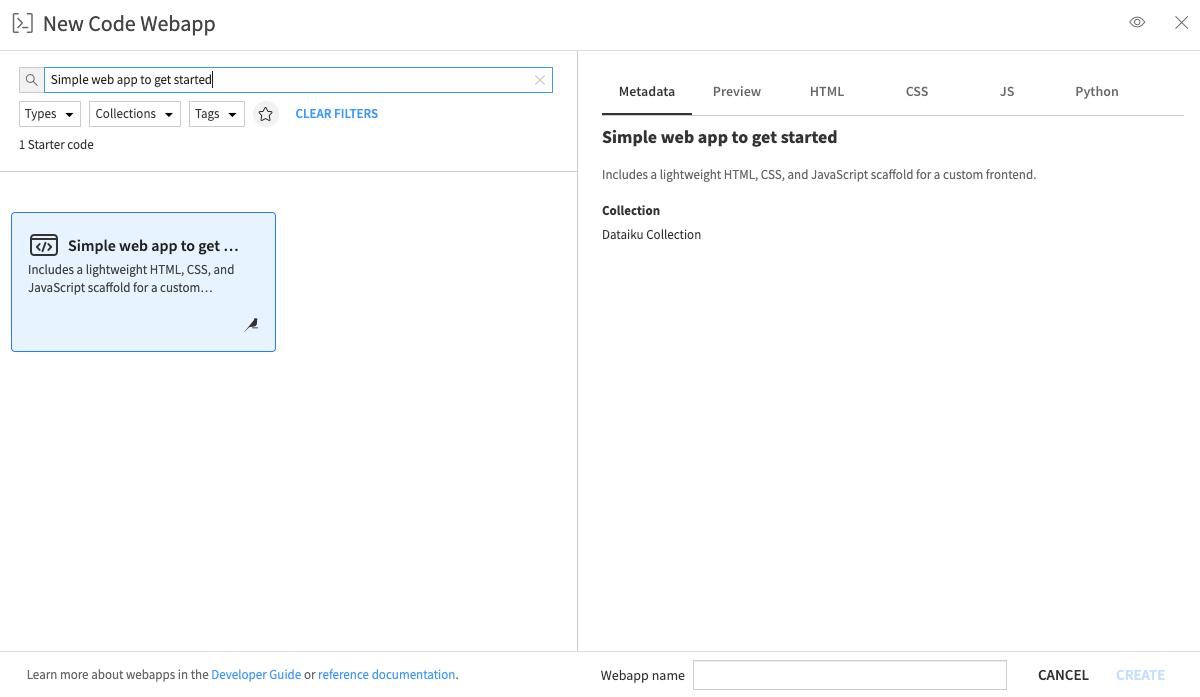
Creating a standard webapp.
The complete Python, HTML, and JavaScript code is provided below.
Copy each part into the corresponding tab of the webapp editor.
In the Python tab, set AGENT_ID to the full identifier of your agent, including the agent: prefix.
You can find it with this code snippet.
Save the webapp before testing it.
The following sections explain how the backend finds a user’s conversation and how the page displays it.
Identifying the user
First, identify the user making each request.
The backend uses get_auth_info_from_browser_headers() to read associatedDSSUser from the request headers.
It uses that identifier to retrieve the user’s conversation without mixing it with another user’s history.
def current_end_user():
    """Return the DSS user browsing the webapp, not the user running the backend."""
    auth_info = client.get_auth_info_from_browser_headers(dict(request.headers))
    end_user_id = auth_info.get("associatedDSSUser")
    if not end_user_id:
        abort(401)
    return end_user_id
Finding or creating a conversation
Next, look for a user’s open conversation with list_llm_conversations().
The method excludes archived conversations, so the backend can use the first result if one exists.
Note
This example assumes the webapp owns its users’ conversations in the project.
If several applications share the project, give each one its own project,
or tag conversations with the metadata argument of
create_conversation() and filter the listing on that tag.
def find_conversation(end_user_id):
    """Return the open conversation of an end user, or None on first contact."""
    conversations = project.list_llm_conversations(
        end_user_id=end_user_id,
        as_type="objects",
    )
    return conversations[0] if conversations else None
If the user has no open conversation, create_conversation() creates one for the agent.
def get_or_create_conversation(end_user_id):
    """Return the open conversation of an end user, creating it when there is none."""
    conversation = find_conversation(end_user_id)
    if conversation is not None:
        return conversation
    agent_llm = project.get_llm(AGENT_ID)
    return agent_llm.create_conversation(end_user_id=end_user_id)
Sending a question to the agent
The /ask endpoint sends only the new question.
Dataiku retrieves the earlier messages to rebuild the history and runs the agent and its tools on the server side.
@app.route("/ask", methods=["POST"])
def ask():
    """Answer one question, in the context of everything asked before."""
    question = (request.get_json(silent=True) or {}).get("question", "")
    if not question:
        return jsonify({"error": "A question is required"}), 400

    conversation = get_or_create_conversation(current_end_user())
    response = conversation.new_completion() \
        .with_message(question) \
        .execute()

    if not response.success:
        return jsonify({"error": "The assistant could not answer"}), 502
    return jsonify({"answer": response.text})
A turn can be accepted even if the agent fails to answer.
Check response.success before reading response.text: a failed turn has no answer to return.
Dataiku keeps the question and failed answer in the conversation so you can inspect or continue it later.
Note
The agent uses the instructions configured in Dataiku, so the webapp sends no system prompt.
Persisted conversations accept user and system messages from the client.
Dataiku writes assistant turns as the conversation progresses.
Displaying the conversation on page load
Use get_messages() in the /history endpoint to retrieve stored messages.
Each message has a role, a status, and a message payload whose content contains the displayed text.
Dataiku also stores internal messages, such as agent memory fragments, so return only user and assistant messages to the page.
@app.route("/history")
def history():
    """Return the conversation so far, so that the page can render it when it loads."""
    conversation = find_conversation(current_end_user())
    if conversation is None:
        return jsonify([])
    turns = []
    for stored_message in conversation.get_messages():
        role = stored_message.get("role")
        if role not in ("user", "assistant"):
            continue
        turns.append({
            "role": role,
            "text": stored_message["message"].get("content", ""),
            "failed": stored_message.get("status") == "ERROR",
        })
    return jsonify(turns)
In the JavaScript tab, call /history whenever the page loads.
The page can then display the stored conversation after a reload:
/**
 * Load the conversation from the backend and display it.
 * This runs on every page load, which is what makes a reload harmless.
 */
function loadHistory() {
    fetch(getWebAppBackendUrl('/history'))
        .then(response => response.json())
        .then(turns => {
            $('#conversation').empty();
            turns.forEach(turn => appendMessage(turn.role, turn.failed ? "(this turn failed)" : turn.text));
        });
}
The page sends each new question to /ask and adds the question and answer to the chat panel.
It does not store the conversation history in the browser.
/**
 * Send the question to the backend and display the answer.
 * @param event: only used to prevent the default form behavior.
 */
window.ask = function (event) {
    event.preventDefault();
    let question = $('#question').val();
    appendMessage("user", question);
    $('#question').val("");

    // The agent can take several seconds: show that the question is being processed
    let pending = appendMessage("assistant", '<span class="spinner-border spinner-border-sm"></span>');
    $('#btn_ask').prop("disabled", true);

    fetch(getWebAppBackendUrl('/ask'), {
        method: "POST",
        headers: {"Content-Type": "application/json"},
        body: JSON.stringify({question: question})
    })
        .then(response => response.json())
        .then(data => pending.text(data.answer || data.error))
        .finally(() => $('#btn_ask').prop("disabled", false));
}
Starting a new conversation
Use update() to archive a conversation when the user clicks New conversation.
An archived conversation remains readable, but accepts no new turns.
You can list it by passing include_archived=True.
Because list_llm_conversations() excludes archived conversations by default,
the user’s next question creates a fresh one.
The /reset endpoint archives every open conversation for the user.
If two requests create conversations at the same time, this prevents an older one from reappearing on the next reload.
@app.route("/reset", methods=["POST"])
def reset():
    """Archive the open conversations of a user, so that the next question starts a new one."""
    conversations = project.list_llm_conversations(
        end_user_id=current_end_user(),
        as_type="objects",
    )
    for conversation in conversations:
        conversation.update(archived=True)
    return jsonify({"closed": len(conversations)})
Tip
You can reopen an archived conversation by setting archived=False.
delete() permanently removes the conversation and its messages.
Checking the conversation history
Start the webapp and ask a question. Then ask the agent to recall it:
Could you tell me again what my previous question was?
The agent should recall your first question, even though the page sent only the follow-up.
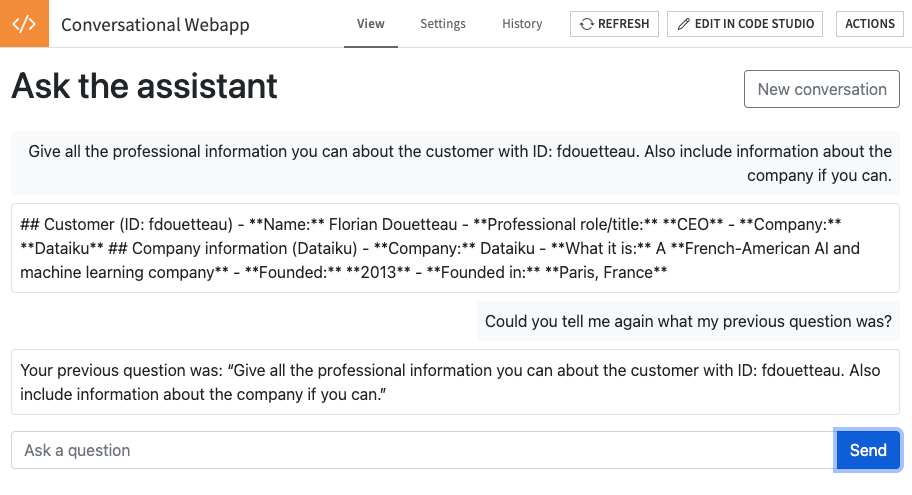
The assistant recalls the previous question.
Reload the page and check that the conversation is still displayed. To confirm that the agent can also use the stored history, ask:
What was the very first question I asked you?
The agent should answer with your opening question.
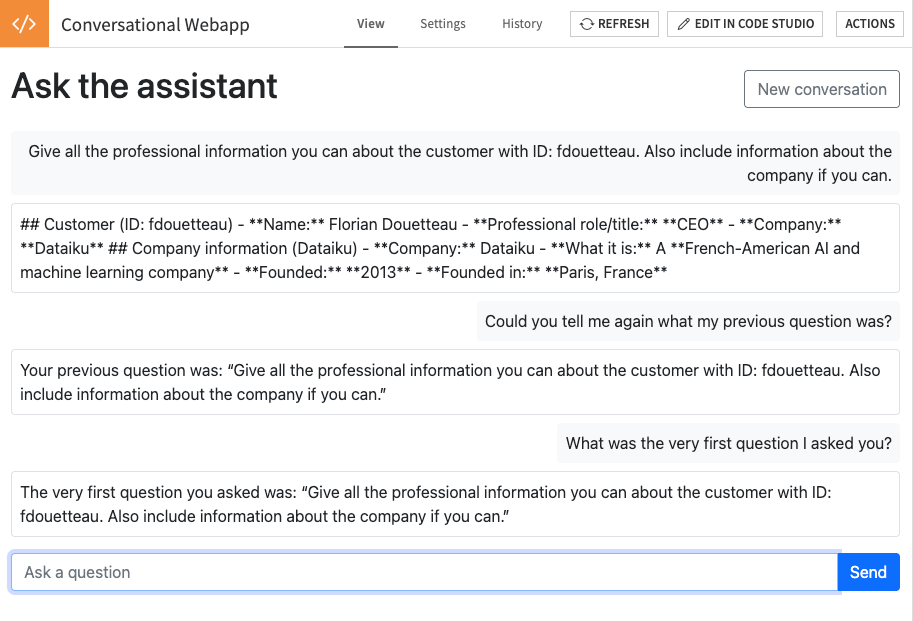
After a reload, the assistant recalls the first question of the conversation.
Finally, restart the webapp backend from the editor and ask:
Remind me what we have talked about so far.
The agent should recap the exchange using the conversation stored in Dataiku.
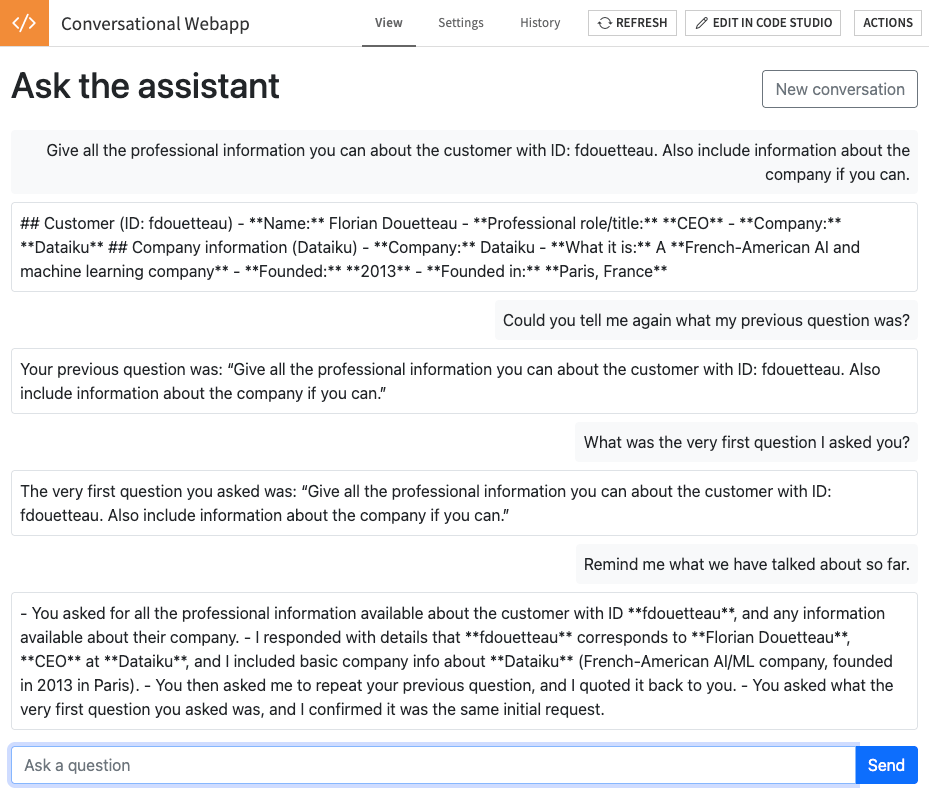
The conversation after a restart of the webapp backend.
Wrapping up
Congratulations! You have built a webapp that holds a multi-turn conversation with an agent without storing its history in the browser or backend. The webapp retrieves the history from Dataiku after a page reload or backend restart. You can adapt the chat interface or use the same approach with another agent in your project.
Complete code
Copy these files into the corresponding tabs of the standard webapp editor.
Set AGENT_ID in the Python code to your agent’s full identifier.
Complete code of the Python backend
import dataiku
from flask import abort, jsonify, request

# Fill with the id of your agent, as listed by project.list_llms(), e.g. "agent:xxxxxxxx"
AGENT_ID = ""

client = dataiku.api_client()
project = client.get_default_project()


def current_end_user():
    """Return the DSS user browsing the webapp, not the user running the backend."""
    auth_info = client.get_auth_info_from_browser_headers(dict(request.headers))
    end_user_id = auth_info.get("associatedDSSUser")
    if not end_user_id:
        abort(401)
    return end_user_id


def find_conversation(end_user_id):
    """Return the open conversation of an end user, or None on first contact."""
    conversations = project.list_llm_conversations(
        end_user_id=end_user_id,
        as_type="objects",
    )
    return conversations[0] if conversations else None


def get_or_create_conversation(end_user_id):
    """Return the open conversation of an end user, creating it when there is none."""
    conversation = find_conversation(end_user_id)
    if conversation is not None:
        return conversation
    agent_llm = project.get_llm(AGENT_ID)
    return agent_llm.create_conversation(end_user_id=end_user_id)


@app.route("/history")
def history():
    """Return the conversation so far, so that the page can render it when it loads."""
    conversation = find_conversation(current_end_user())
    if conversation is None:
        return jsonify([])
    turns = []
    for stored_message in conversation.get_messages():
        role = stored_message.get("role")
        if role not in ("user", "assistant"):
            continue
        turns.append({
            "role": role,
            "text": stored_message["message"].get("content", ""),
            "failed": stored_message.get("status") == "ERROR",
        })
    return jsonify(turns)


@app.route("/ask", methods=["POST"])
def ask():
    """Answer one question, in the context of everything asked before."""
    question = (request.get_json(silent=True) or {}).get("question", "")
    if not question:
        return jsonify({"error": "A question is required"}), 400

    conversation = get_or_create_conversation(current_end_user())
    response = conversation.new_completion() \
        .with_message(question) \
        .execute()

    if not response.success:
        return jsonify({"error": "The assistant could not answer"}), 502
    return jsonify({"answer": response.text})


@app.route("/reset", methods=["POST"])
def reset():
    """Archive the open conversations of a user, so that the next question starts a new one."""
    conversations = project.list_llm_conversations(
        end_user_id=current_end_user(),
        as_type="objects",
    )
    for conversation in conversations:
        conversation.update(archived=True)
    return jsonify({"closed": len(conversations)})
Complete HTML of the webapp
<link href="https://cdn.jsdelivr.net/npm/[email protected]/dist/css/bootstrap.min.css" rel="stylesheet"
      integrity="sha384-1BmE4kWBq78iYhFldvKuhfTAU6auU8tT94WrHftjDbrCEXSU1oBoqyl2QvZ6jIW3" crossorigin="anonymous">

<div class="container-fluid py-3">
    <div class="d-flex justify-content-between align-items-center">
        <h1>Ask the assistant</h1>
        <button id="btn_reset" class="btn btn-outline-secondary" onclick="resetConversation()">
            New conversation
        </button>
    </div>

    <div id="conversation" class="my-3"></div>

    <form action="" onsubmit="ask(event)">
        <div class="input-group">
            <input id="question" type="text" class="form-control"
                   placeholder="Ask a question" autocomplete="off" required/>
            <button id="btn_ask" type="submit" class="btn btn-primary">Send</button>
        </div>
    </form>
</div>

<script src="https://cdn.jsdelivr.net/npm/[email protected]/dist/js/bootstrap.bundle.min.js"
        integrity="sha384-ka7Sk0Gln4gmtz2MlQnikT1wXgYsOg+OMhuP+IlRH9sENBO0LRn5q+8nbTov4+1p"
        crossorigin="anonymous"></script>
Complete JavaScript of the webapp
/**
 * Render one message in the conversation panel.
 * @param role: "user" or "assistant".
 * @param text: the message text.
 * @returns the bubble, so that its content can be replaced later.
 */
function appendMessage(role, text) {
    let alignment = role === "user" ? "text-end" : "text-start";
    let color = role === "user" ? "bg-light" : "bg-white border";
    let bubble = $(`<span class="d-inline-block p-2 rounded ${color}">${text}</span>`);
    $('#conversation').append($(`<div class="${alignment} mb-2"></div>`).append(bubble));
    return bubble;
}

/**
 * Load the conversation from the backend and display it.
 * This runs on every page load, which is what makes a reload harmless.
 */
function loadHistory() {
    fetch(getWebAppBackendUrl('/history'))
        .then(response => response.json())
        .then(turns => {
            $('#conversation').empty();
            turns.forEach(turn => appendMessage(turn.role, turn.failed ? "(this turn failed)" : turn.text));
        });
}

/**
 * Send the question to the backend and display the answer.
 * @param event: only used to prevent the default form behavior.
 */
window.ask = function (event) {
    event.preventDefault();
    let question = $('#question').val();
    appendMessage("user", question);
    $('#question').val("");

    // The agent can take several seconds: show that the question is being processed
    let pending = appendMessage("assistant", '<span class="spinner-border spinner-border-sm"></span>');
    $('#btn_ask').prop("disabled", true);

    fetch(getWebAppBackendUrl('/ask'), {
        method: "POST",
        headers: {"Content-Type": "application/json"},
        body: JSON.stringify({question: question})
    })
        .then(response => response.json())
        .then(data => pending.text(data.answer || data.error))
        .finally(() => $('#btn_ask').prop("disabled", false));
}

/**
 * Archive the current conversation and clear the panel.
 */
window.resetConversation = function () {
    fetch(getWebAppBackendUrl('/reset'), {method: "POST"})
        .then(() => $('#conversation').empty());
}

loadHistory();
Reference documentation
Classes
|
Entry point for the DSS API client |
|
A handle to interact with a DSS-managed LLM. |
|
A handle to interact with a persisted LLM conversation. |
A query that appends a turn to an existing persisted conversation. |
|
|
Response to a persisted conversation turn. |
|
A handle to interact with a project on the DSS instance. |
Functions
Build an API client for the current DSS instance. |
|
|
Create a persisted conversation bound to this LLM. |
|
Hard-delete the conversation. |
|
Append and execute this persisted conversation turn. |
|
Returns various information about the DSS user authenticated by the dictionary of HTTP headers provided in headers_dict. |
Get a handle to the current default project, if available (i.e. if dataiku.default_project_key() is valid). |
|
|
Get a handle to interact with a specific LLM |
|
Retrieve persisted conversation messages. |
|
List persisted LLM conversations in this project. |
|
Prepare a new turn on this persisted conversation. |
|
Update persisted conversation metadata. |
|
Add a |