

Creating a structured agent block component
This tutorial explains how to create a custom block for a Structured Visual Agent in Dataiku. Custom blocks are useful when built-in blocks are not sufficient for your orchestration logic, and you need to execute specific Python code within the agent flow.
In this tutorial, you will create a block named Shortcut story retriever.
This block reads a story_id from the agent state, calls the Shortcut API,
stores the returned story in the state, optionally sends a message to the user,
and then routes execution to the next block.
Prerequisites
Dataiku >= 14.4.3
Develop plugins permission
Python >= 3.9
A Shortcut API token
Note
If you need help in using the Shortcut API or obtaining a Shortcut API token, please refer to their documentation.
Introduction
To develop a custom Structured Agent block, you must first create a plugin or reuse an existing one.
Go to the main menu, click the Plugins menu, and select Write your own from the Add plugin button.
Then choose a meaningful name, such as shortcut-management.
Once the plugin is created, click the Create a code environment button and select Python as the default language.
In the spec/requirements.txt file of the plugin code environment, add the following dependency:
requests
Once you have saved the modification, go to the Summary tab to build the plugin code environment. The custom block will use this code environment when it is executed.
Click the + New component button, and choose the Structured Agent Block component from the provided list, as shown below.
Then, complete the form by choosing a meaningful identifier, such as story-block and clicking the Add button.

Fig. 1: New structured agent block component.
This tutorial uses a block that relies on a plugin preset named shortcut-token.
This preset must expose a value named shortcut_api_token.
You can keep these names or adapt the JSON and Python code to match your own preset.
If you also want to create this preset from scratch,
follow the companion tutorial Creating a parameter set component.
Creating the block
A custom block is created with two files:
block.json: the block descriptor and UI configurationstructured_agent_block.py: the Python implementation
The block also assumes that a previous step in the Structured Visual Agent has already stored a story_id in the state.
For example, an earlier block can extract the story identifier from the user request
and store it with the key story_id.
Configuring the block
The JSON descriptor defines how the block appears in the editor and which configuration fields are available to the agent builder. Code 1 shows the descriptor used in this tutorial.
This configuration declares:
The block label, description, and icon.
The Python class that implements the block.
A preset parameter for the Shortcut API token.
Two user-facing options: whether to send a message to the user and which state key to use for storage.
block.json¶/* This file is the descriptor for custom structured agent block florent-block */
{
"meta" : {
"label": "Shortcut story retriever",
"description": "To retrieve a shortcut story, use this block",
"icon": "dku-icon-deep-learning-32"
},
"pyClazzName": "shortcutmanagement.structured-agent-block.CustomStructuredAgentBlock",
"params": [
{
"type" : "SEPARATOR",
"label": "API Key"
},
{
"type": "PRESET",
"name": "api_key",
"label": "Your shortcut API Token",
"parameterSetId": "shortcut-token"
},
{
"type" : "SEPARATOR",
"label": "Output"
},
{
"type": "BOOLEAN",
"name": "send_to_user",
"label": "Send to user",
"description": "Send output to user."
},
{
"type": "STRING",
"name": "state_key",
"label": "State key",
"description": "Key to store in the state"
},
{
"type" : "SEPARATOR",
"label": "Next block"
}
]
}
The preset parameter is useful because this block should not embed secrets directly in the code.
The state_key parameter gives the agent builder flexibility,
allowing them to decide where to store the retrieved Shortcut story in the state.
Coding the block
To implement a custom Structured Agent block, you must create a class derived from BlockHandler.
The associated Python file should be located in the plugin’s python-lib folder.
This class receives the current turn, the sequence context, and the block configuration.
In this tutorial, the constructor retrieves:
the
story_idfrom the turn statethe Shortcut token from the configured preset
the optional behavior parameters from the block configuration
The main logic is implemented in process_stream.
This function calls the Shortcut API, stores the full response in the state,
adds a compact object to the trace outputs, optionally emits a message to the user,
and finally yields NextBlock with the configured defaultNextBlock to continue the execution of the graph.
structured-agent-block.py¶# This file is the implementation of custom agent structured agent block florent-block
from dataiku.llm.python.blocks_graph import BlockHandler, NextBlock
import json
import requests
import logging
logger = logging.getLogger(__name__)
class CustomStructuredAgentBlock(BlockHandler):
def __init__(self, turn, sequence_context, block_config):
super().__init__(turn, sequence_context, block_config)
self.story_id = self.turn.state_get("story_id")
if not self.story_id:
raise ValueError("Missing 'story_id' in state")
preset_value = self.block_config.get("config").get("api_key")
if not preset_value:
raise ValueError("Missing preset 'api_key' in block config")
self.api_token = preset_value.get("shortcut_api_token")
if not self.api_token:
raise ValueError("Missing 'shortcut-token' in preset 'api_token'")
self.send_to_user = self.block_config.get("config").get("send_to_user")
self.state_key = self.block_config.get("config").get("state_key")
def process_stream(self, trace):
url = f"https://api.app.shortcut.com/api/v3/stories/{self.story_id}"
headers = {
"Content-Type": "application/json",
"Shortcut-Token": self.api_token,
}
response = requests.get(url, headers=headers, timeout=30)
if response.status_code == 404:
raise ValueError(f"Story {self.story_id} not found")
else:
response.raise_for_status()
story = response.json()
self.turn.state_set(self.state_key, story)
trace.outputs["output"] = {
"story_id": self.story_id,
"story_name": story.get("name"),
"app_url": story.get("app_url"),
}
logger.info(json.dumps(story, indent=2))
if (self.send_to_user):
yield {
"chunk": {
"text": f"""Shortcut story {self.story_id} fetched: {story.get('name', '<no name>')}
{story}"""
}
}
yield NextBlock(id=self.block_config.get("defaultNextBlock"))
There are a few important implementation details in this code:
The block fails fast if
story_idis missing from the state.The block reads the API token from the preset instead of hardcoding it.
self.turn.state_set(...)stores the full Shortcut story for downstream blocks.trace.outputs["output"]exposes a lightweight summary in the execution trace.yield NextBlock(id=self.block_config.get("defaultNextBlock"))hands control back to the Structured Visual Agent graph.
Using the block
Once the block has been coded, you can use it in any Structured Visual Agent. For more information about Structured Visual Agents, refer to Structured Visual Agents.
Create or open a Structured Visual Agent, then add your custom block to the graph. Configure the block with:
A preset instance containing the Shortcut API token.
A value for
state_keysuch asshortcut_story.The optional
send_to_userflag depends on whether you want the block to emit a user-visible message.
Make sure a previous block has already written the story_id into the state.
After execution, downstream blocks will be able to access the stored story through the key defined in state_key.
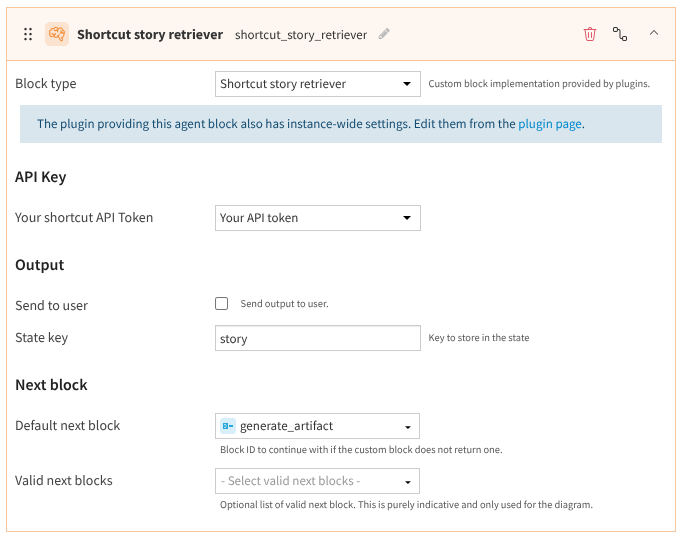
Fig. 2: The story retriever.
For example, the next screenshot shows how this block is used in a complete flow of structured blocks and how it integrates with Dataiku.
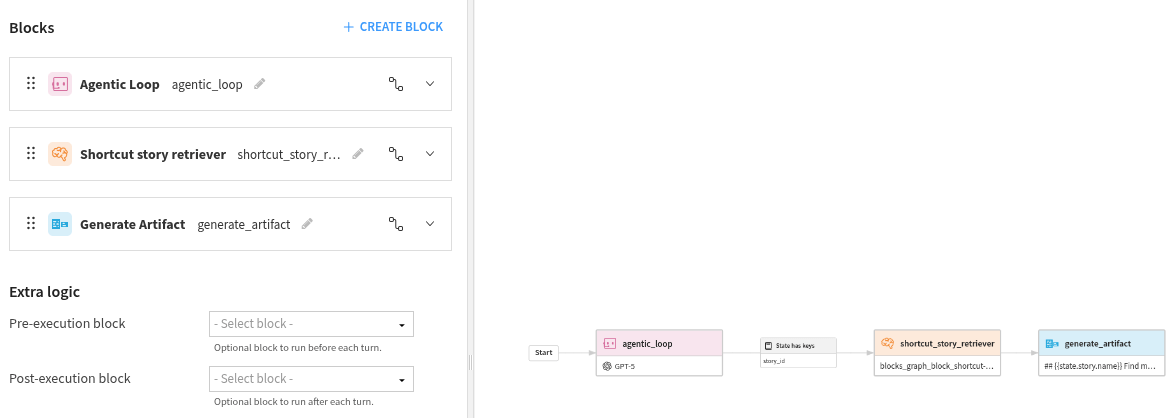
Fig. 3: Complete agentic flow.
The first block of this workflow defines an agentic loop that prompts the user to enter a valid Story ID.
Once the ID has been filled, the agent saves it in the state.
And when the state has the key story_id, it calls our newly defined block.
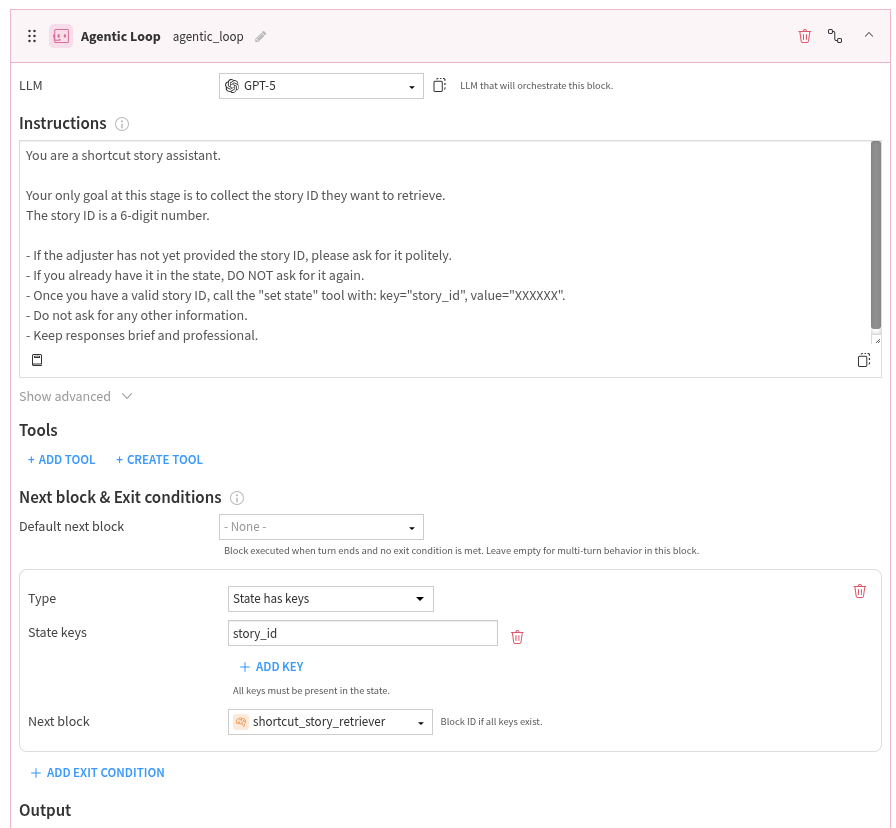
Fig. 4: Agentic block.
In case of need, here is the prompt used in the Agentic loop:
You are a shortcut story assistant.
Your only goal at this stage is to collect the story ID they want to retrieve.
The story ID is a 6-digit number.
- If the adjuster has not yet provided the story ID, please ask for it politely.
- If you already have it in the state, DO NOT ask for it again.
- Once you have a valid story ID, call the "set state" tool with: key="story_id", value="XXXXXX".
- Do not ask for any other information.
- Keep responses brief and professional.
Conclusion
You have now learned how to create a custom Structured Visual Agent block in Dataiku. This type of plugin component is useful when you need a reusable building block that integrates external systems directly into a Structured Visual Agent graph.
The example shown in this tutorial demonstrates a common pattern: retrieve structured data from an external API, store it in the agent state, and pass execution to the next block. You can reuse this pattern for many business integrations beyond Shortcut.
Here is the complete code of this tutorial:
block.json
/* This file is the descriptor for custom structured agent block florent-block */
{
    "meta" : {
        "label": "Shortcut story retriever",
        "description": "To retrieve a shortcut story, use this block",
        "icon": "dku-icon-deep-learning-32"
    },
    "pyClazzName": "shortcutmanagement.structured-agent-block.CustomStructuredAgentBlock",
    "params": [
        {
            "type" : "SEPARATOR",
            "label": "API Key"
        },
        {
            "type": "PRESET",
            "name": "api_key",
            "label": "Your shortcut API Token",
            "parameterSetId": "shortcut-token"
        },
        {
            "type" : "SEPARATOR",
            "label": "Output"
        },
        {
            "type": "BOOLEAN",
            "name": "send_to_user",
            "label": "Send to user",
            "description": "Send output to user."
        },
        {
            "type": "STRING",
            "name": "state_key",
            "label": "State key",
            "description": "Key to store in the state"
        },
        {
            "type" : "SEPARATOR",
            "label": "Next block"
        }
    ]
}
structured-agent-block.py
# This file is the implementation of custom agent structured agent block florent-block
from dataiku.llm.python.blocks_graph import BlockHandler, NextBlock
import json
import requests
import logging

logger = logging.getLogger(__name__)


class CustomStructuredAgentBlock(BlockHandler):
    def __init__(self, turn, sequence_context, block_config):
        super().__init__(turn, sequence_context, block_config)
        self.story_id = self.turn.state_get("story_id")
        if not self.story_id:
            raise ValueError("Missing 'story_id' in state")

        preset_value = self.block_config.get("config").get("api_key")
        if not preset_value:
            raise ValueError("Missing preset 'api_key' in block config")
        self.api_token = preset_value.get("shortcut_api_token")
        if not self.api_token:
            raise ValueError("Missing 'shortcut-token' in preset 'api_token'")

        self.send_to_user = self.block_config.get("config").get("send_to_user")
        self.state_key = self.block_config.get("config").get("state_key")

    def process_stream(self, trace):
        url = f"https://api.app.shortcut.com/api/v3/stories/{self.story_id}"
        headers = {
            "Content-Type": "application/json",
            "Shortcut-Token": self.api_token,
        }

        response = requests.get(url, headers=headers, timeout=30)
        if response.status_code == 404:
            raise ValueError(f"Story {self.story_id} not found")
        else:
            response.raise_for_status()

            story = response.json()

            self.turn.state_set(self.state_key, story)

            trace.outputs["output"] = {
                "story_id": self.story_id,
                "story_name": story.get("name"),
                "app_url": story.get("app_url"),
            }

            logger.info(json.dumps(story, indent=2))
            if (self.send_to_user):
                yield {
                    "chunk": {
                        "text": f"""Shortcut story {self.story_id} fetched: {story.get('name', '<no name>')}
                        {story}"""
                    }
                }
            yield NextBlock(id=self.block_config.get("defaultNextBlock"))