

Configuring per-user SSH in Dataiku
In this tutorial, you will learn how to generate and configure a per-user SSH key in Dataiku so you can securely access Git repositories that are not available through the global SSH key. You will also understand how personal and global SSH keys interact, so you can use the right setup for your repositories and permissions.
Prerequisites
Dataiku 14.5 or higher
A user account with per-user SSH keys enabled
Introduction
Per-user SSH keys are a great way to access Git repositories that aren’t accessible via the globally configured SSH key. They also add a layer of security to only let certain people access certain repositories.
Configuring an SSH key for a user involves a few steps, but it only works if the feature is enabled for your user (or group).
Generating an SSH key
To generate the SSH key, head to your user profile by clicking on your profile image on the top-right of the screen, and then in the dropdown, click the Gears icon to go to Profile and Settings.
Next, click on the Credentials tab at the top of the screen, and within the Credentials page, click on the SSH tab. There you’ll see a page that looks like this.
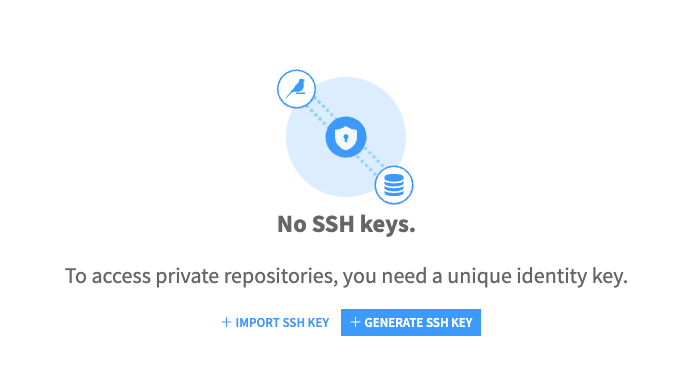
Click on the Generate SSH Key button and enter your details as you wish. Here you can specify a name for your SSH key, a regular expression for which repositories you want Dataiku to use your SSH key, and the type of key you want to generate.
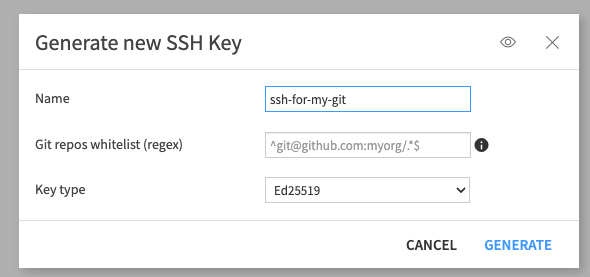
Once you click Generate, your SSH key will be generated and be ready to use.
Using the SSH Key
There’s only one last step required before your SSH key can be used, and that is copying the public key to GitHub. Click the Copy Public Key button on the right of the screen. Then head over to GitHub to install your SSH key. You can find out how to do this in the GitHub documentation.
Once you’ve configured the SSH key on GitHub, you can test it by pasting the path to a repository you have access to — but to which the globally configured SSH key does not have access — into the field at the bottom of the page.
For example git@github.com:MyUser/private-repository.git.
Personal and Global SSH key configuration
When both your personal SSH key and the global SSH key are configured, Dataiku can choose either of the SSH keys depending on the context. If the repository is only accessible by one of the keys, it will automatically choose the SSH key that has access to the repository. However, if both SSH keys are configured, SSH itself will choose which key will be used.
However, this works differently depending on how the global SSH key is set up. If the global SSH key is configured through the ssh_config, SSH decides which available key to use. If the global SSH key is configured through Dataiku Git security rules, Dataiku does not try one key and then the other. Instead, it follows the first matching rule. If that rule allows personal SSH keys and the user has a matching key for the repository, Dataiku uses the personal SSH key. Otherwise, it uses the global key defined by the rule.
Conclusion
Having a personal SSH key can be beneficial for many reasons, but the most important one is that it will give you access to your own repositories without giving the rest of the organization access to them as well. This adds a layer of security and flexibility to give each user their own keys with their own rules.